

Someone on your Pipedrive team starts calling down a list, and you find out Pipedrive has no phone. So you price a dialer app, then you look at Close, where the phone is built in and billed by the minute. The two bills end up closer than their seat prices suggest.
Pipedrive vs Close comes down to what your reps do most. Pipedrive suits teams who manage deals on a board and call only sometimes, while Close suits teams who dial all day from a list. Fluid CRM has no dialer and suits teams whose deals start as email and LinkedIn replies.
What a Rep’s Morning Looks Like in Pipedrive and in Close
Pipedrive and Close both have a board, both store contacts and both remind you about tasks. What separates them is the screen a rep starts from, and that screen explains what each vendor charges for.
Pipedrive is built around the deal. A rep opens the board, looks for overdue activities and tiles that turned red after too many idle days, then decides who to contact. Pipedrive’s support page says plainly that it has no built-in calling, so the call runs through a Marketplace app such as Aircall, JustCall or Kixie.
Close is built around the call. A rep opens a saved list called a Smart View and clicks Call, and the Power Dialer rings each lead in order, stopping for notes when someone answers. Emails, missed calls, voicemails and due tasks land in Close’s Inbox, which works as the rep’s to-do list.
| Moment in the day | Pipedrive | Close |
|---|---|---|
| First screen | The deal board, stage by stage | A Smart View of leads, or the Inbox |
| Who comes next | The rep picks, from overdue activities and red tiles | The next lead in the list, or the next Inbox item |
| Making the call | One click through a connected calling app | Built in, with the Power Dialer from the Growth plan |
| After the call | The app logs it and the rep schedules the next activity | Close logs it and the rep adds notes before the next dial |
| Sending a text | Through the calling app | Built in |
| A deal stalls | The tile turns red after the idle days you set per stage | A “Needs attention” toggle on the pipeline view flags it |
Each tool can do some of the other’s job. Close has a drag-and-drop pipeline view with several pipelines on every plan, and a Pipedrive rep can start a call from a deal in one click.
So when your rep sits down at 9:00, do they need to decide who to call, or do they just need to start calling? The first answer points to Pipedrive and the second points to Close.
Some reps do neither, because their first job each morning is a reply that came in overnight. We built Fluid CRM for them, a sales team CRM with no phone in it, and that case gets its own section at the end.
What a Calling Team Pays on Pipedrive and on Close
A Close vs Pipedrive comparison on seat price alone says $39 against $99, and a calling team never pays either number. Pipedrive’s bill is the seat plus a calling app, while Close’s bill is the seat plus a phone line and minutes.
Here is what I assumed, so you can swap in your own numbers. Each rep bills 1,000 minutes of call time a month, about 50 minutes a day over 20 working days, and then 2,000. All calls stay inside the US and Canada and everything is on annual billing.
- Close: most outbound calls cost around $0.02 a minute and each line starts at about $1 a month.
- Pipedrive: I used Aircall as the example app, since it is one Pipedrive names. Its Professional plan starts at $50 per license with a power dialer and unlimited US and Canada calls. One number comes with the plan and each extra number is $6 a month.
| Monthly cost with a power dialer | 3 reps | 5 reps |
|---|---|---|
| Pipedrive Growth plus Aircall Professional | $279 | $469 |
| Close Growth, 1,000 minutes per rep | $360 | $600 |
| Close Growth, 2,000 minutes per rep | $420 | $700 |
At these list prices the Pipedrive setup costs about $26 to $47 less per rep a month. Count billed minutes when you test this, because Close rounds every call up to the next full minute and a 70-second call bills as 2.
What the extra money buys on Close
That gap pays for one login holding the phone, email, texts and pipeline. Close’s Power Dialer reads from a live Smart View that adds and drops leads as they change, while Aircall’s imports a list of up to 1,000 numbers. Close’s workflows also mix emails, texts and call tasks in one sequence.
The Aircall setup has its own advantage. Recording, transcription and call summaries are in Aircall Professional, while summaries on Close come from Call Assistant at $50 a month per account plus $0.02 a minute.
Team size can erase the saving. Aircall requires 3 licenses, so a 2-rep team pays $234 a month for the Pipedrive setup against $240 on Close Growth at 1,000 minutes. Calls abroad change the sums too, since Aircall’s flat calling stops at the US and Canada and Close’s rates vary by country.
When your reps dial by hand
Drop the power dialer and the order flips at normal volumes. Aircall’s Essentials plan starts at $30 per license on annual billing.
| Monthly cost dialing by hand | 3 reps | 5 reps |
|---|---|---|
| Pipedrive Growth plus Aircall Essentials | $219 | $369 |
| Close Essentials, 1,000 minutes per rep | $168 | $280 |
| Close Essentials, 2,000 minutes per rep | $228 | $380 |
Close Essentials stays cheaper until a rep bills about 1,850 to 1,900 minutes a month. The catch is that Essentials has no workflows, while Pipedrive Growth includes automations and email sequences.
When your reps barely call
A team that makes a few calls a week can skip the dialer entirely, and then the seats are nearly the whole bill.
| Monthly seats only, before any calling | 3 seats | 5 seats |
|---|---|---|
| Pipedrive Growth | $117 | $195 |
| Close Essentials | $105 | $175 |
| Close Growth | $297 | $495 |
Our breakdown of Close CRM pricing covers every usage line on that invoice.
Pipedrive and Close Plans Compared Job by Job
Both vendors sell a plan called Growth, at $39 and $99, and the two do different jobs. Compare the plans by position instead of by name. The first figure is the annual rate and the one in brackets is month to month, per seat.
| Position | Pipedrive | Close |
|---|---|---|
| Entry | Lite, $14 ($24) | Solo, $9 ($19), one user only |
| Second | Growth, $39 ($49) | Essentials, $35 ($49) |
| Third | Premium, $59 ($79) | Growth, $99 ($109) |
| Top | Ultimate, $79 ($99) | Scale, $139 ($149) |
This table shows the cheapest team plan that does each job, using annual rates.
| The job | Pipedrive | Close |
|---|---|---|
| Best for | Managing known deals on a board | Calling, emailing and texting from a list |
| Two-way email sync | Growth, $39, 1 account per seat | Essentials, $35, 3 accounts |
| Automations | Growth, $39, up to 50 | Growth, $99, as workflows |
| Email sequences | Growth, $39, up to 5 | Growth, $99, inside workflows |
| Built-in calling | Not offered, needs an app | Essentials, $35, plus usage |
| Power dialer | Through an app | Growth, $99 |
| Predictive dialer | Not offered by Pipedrive itself | Scale, $139 |
| Text messages | Through an app | Essentials, $35, plus usage |
| Web forms | Premium, $59, or LeadBooster from $32.50 a month | Essentials, $35 |
| Custom fields | 30 on Lite, 100 on Growth | 250 on every plan |
| Pipelines | Unlimited from Lite | Several on every plan |
| API | Every plan | Every plan |
| Other apps | 500+ integrations | 100+ integrations |
| Mobile apps | Yes | Yes |
| Built-in AI | Meeting intelligence from Lite | Chloe AI agent on every plan, in workflows from Growth |
Both offer a 14-day free trial with no credit card, and Close adds a 30-day money-back guarantee. Add-ons are where Pipedrive’s bill grows, and our Pipedrive pricing guide lists each one.
Which Sales Teams Should Buy Pipedrive and Which Should Buy Close
Buy Close if your reps spend most of the day on the phone working through a list, and buy Pipedrive if they spend it moving known deals forward. Here is that rule applied to specific teams.
| Your team | Pick | Why |
|---|---|---|
| 3 to 5 reps dialing from a list every morning, all in one tool | Close Growth | A live call list, with phone, email and texts in one login |
| 3 to 5 reps dialing, happy with a separate dialer | Pipedrive Growth plus an app | A smaller bill at list price, with the board as the home screen |
| 2 reps dialing every day | Close Growth | At about 1,000 minutes per rep, Aircall’s 3-license minimum removes most of the saving |
| Reps dialing by hand, no automation needed | Close Essentials | The cheapest way to get a phone in the CRM |
| Deals from meetings, referrals and inbound, with calls now and then | Pipedrive Growth | Email sync and automations, with no calling bill |
| One seller who rarely calls and wants the board | Pipedrive Lite | $14 on annual billing, with no calling bill |
| One person calling and emailing | Close Solo | $9 on annual billing, capped at 10,000 leads, no workflows |
| A manager who coaches live calls | Close Scale | Live coaching and the predictive dialer are on this plan only |
Close Growth is an excellent buy for a team that dials every morning and a poor one for a team that calls ten people a week. That second team pays $60 more per seat than Pipedrive Growth for a dialer it rarely opens.
I would also talk most Pipedrive teams out of moving just because someone started calling. Adding an app costs far less effort than moving every deal and rebuilding your automations, so wait until the phone is the main job for most of the team.
Already on Close and barely dialing? Our Close CRM alternatives are sorted by how a team sells. If the board itself is what bothers you on Pipedrive, start with these Pipedrive alternatives.
How to Decide Whether to Trial Pipedrive or Close First
Your team’s real calling week settles which trial to start first. Look at each rep’s dials last week and ask whether the phone or the board took up most of the day.
- If calling filled most of the day: start with Close, because a dialer is the job.
- If calls were occasional: start with Pipedrive, because the board is the job.
- If it was a mix: run both on the same real leads for a week.
Test the whole setup and not only the CRM, with your reps making real calls during the trial.
A Pipedrive trial has no phone in it, so connect a dialer as well. Aircall offers free access for testing.
Then time one thing in each tool, from the first dial to the note saved on the right record. The tool with the shorter time and fewer open tabs is the one your reps will keep using.
Pipedrive vs Close FAQ
No. Pipedrive’s own support page says it has no built-in calling, so you connect a Marketplace app such as Aircall, JustCall, Kixie or CloudTalk. Most of those apps log completed calls back to Pipedrive automatically, and you pay the app’s vendor separately.
With a power dialer, yes. Close Growth costs about $120 to $140 per rep a month at 1,000 to 2,000 minutes, against about $93 for Pipedrive Growth plus Aircall Professional. Dialing by hand, Close Essentials is often the cheaper one, but it has no workflows.
Yes. Close has a pipeline view where you drag deals between stages, and every plan can run several pipelines. The Power Dialer and the Inbox both work from lists, so calling reps tend to start there instead.
Close bills calling by usage on top of the seat price. Most outbound calls cost around $0.02 a minute, each call rounds up to the next full minute and phone lines start at about $1 a month. Rates vary by country and number type.
Yes, and the contacts and deals are the easy part. Stages, custom fields and automations need setting up again in the new tool, and you should cancel your calling app only after the first full month of dialing in Close.
What to Pick if Your Deals Start as Email or LinkedIn Replies
Plenty of small teams never run a dial list at all. In almost 4 years of B2B outbound, including my old agency Fenixtal, I have seen 5,000+ positive replies come in from cold email and LinkedIn. A reply with no owner and no date on it dies in somebody’s inbox, and a faster dialer would not have saved it.
Fluid CRM is built for that moment. A reply becomes a deal with a stage, a next action and a reminder, and it takes seconds to update. Claude or ChatGPT can also update it from outside the app, and a daily digest email shows who is due.
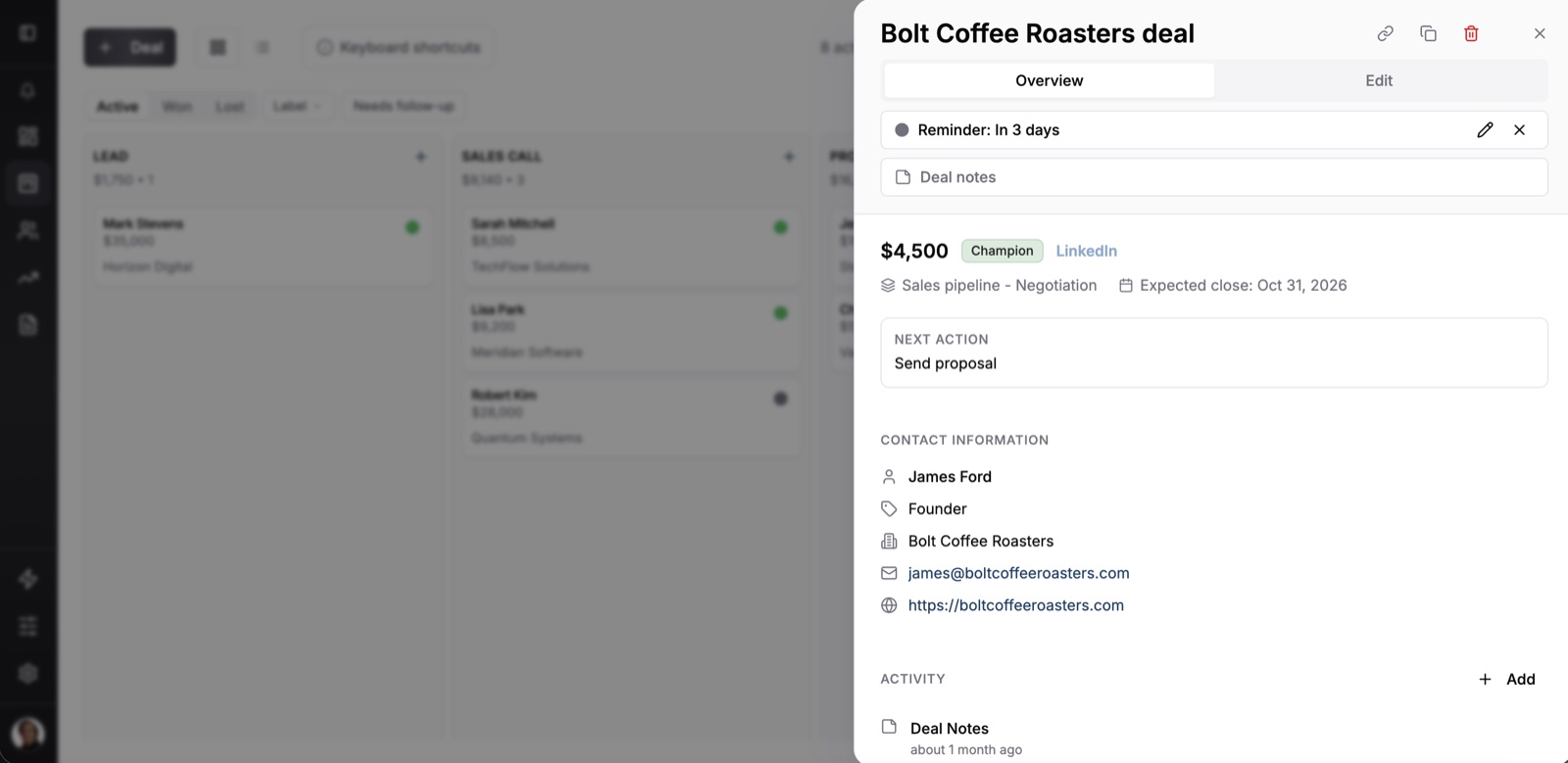
A verified customer, a small business owner with one outside salesperson, wrote a few weeks into using Fluid CRM that it had “already made a significant impact in the way in which I’m interacting with my prospects and clients.”
Fluid CRM costs $16 per seat per month or $144 per seat per year, with every feature in one plan. It has no dialer, so for a team that calls all day it is not the tool for it. It also logs email by BCC, without the two-way sync Close and Pipedrive Growth offer.
We compare it directly in Fluid CRM vs Close and Fluid CRM vs Pipedrive. If your first job each morning is a reply and not a dial list, try Fluid CRM as your sales team CRM with your last ten interested replies.
Start your 7-day free trial here, no credit card required.