

Your next job is sitting in a notebook, a foreman’s head or a WhatsApp thread nobody checks. That’s how construction companies lose bids, not to better competitors but to their own follow-up. This post splits the two jobs construction software actually does and names the right tool for each.
The best CRM for construction companies depends on the job. To win work, a sales CRM like Fluid CRM tracks leads, enquiries and bid follow-ups for $16 per seat per month. To run jobs, construction software like JobTread, Buildertrend or Procore handles scheduling, budgets and change orders.
For contractors chasing bids, not running jobs
Quotes die when nobody follows up. Fluid CRM emails you who’s due.
No credit card required
Why Most Construction Companies Search for the Wrong Tool
Type “CRM for construction” into Google and you get ten tools that all promise to run your entire business. Scheduling, invoicing, change orders, job costing and lead tracking, all in one login. A lot of construction companies searching for a CRM actually need job management software, not a CRM at all.
The confusion is built into the marketing. Every platform calls itself a CRM because the word ranks, even when the product is really a job management system with a lead board stapled on the front.
I ran outbound for a few construction companies at Fenixtal for three years and saw the same thing over and over. Leads lived in a notebook or in a foreman’s head, and any bid that didn’t get a second follow-up died quietly. The work was there. The system holding it wasn’t.
So before you buy anything, get clear on which problem is actually costing you money. Are you losing bids you never followed up on, or are you losing margin because jobs run loose once they start? Those are two different problems with two different tools.
Construction CRM vs Job Management Software
Construction software does two different jobs, and almost no buyer separates them. Winning work is the sales side, where leads, enquiries, quotes and bid follow-ups live before a job exists. Running jobs is the delivery side, where scheduling, budgets, change orders and invoicing take over once the work is won.
A sales CRM is built for the first job. A construction platform is built for the second. Most of the “construction CRM” lists online blur these together, which is why every tool sounds identical and none of them helps you choose.
| Job | What it covers | Right tool |
|---|---|---|
| Winning work | Leads, enquiries, quotes, bid follow-ups | Sales CRM (Fluid CRM, Pipedrive) |
| Running jobs | Scheduling, budgets, change orders, invoicing | Construction platform (JobTread, Buildertrend, Procore) |
Get the split clear and the rest of this list sorts itself. The tools below are grouped the same way. If you supply builders rather than build, such as a building materials distributor, our guide to the best CRM for manufacturers and distributors fits you better.
The 8 Best CRMs for the Construction Industry
The eight CRMs and construction tools below split into two camps, sales CRMs that win work and construction platforms that run jobs. The first three track the sales side. The last five run the build. Pick based on which problem is bigger for you right now.
| CRM | Side | Best for | Starting price |
|---|---|---|---|
| Fluid CRM | Wins work | Small builders and remodelers tracking enquiries and bids | $16 per seat per month, every feature included |
| Pipedrive | Wins work | Sales teams chasing commercial bids | $14 per seat per month billed annually |
| HubSpot Sales Hub | Wins work | Firms running inbound marketing | $20 per seat per month on Starter, billed monthly |
| JobTread | Runs jobs | General contractors and remodelers | $199 a month plus $20 per extra user |
| Buildertrend | Runs jobs | Residential home builders | From $499 a month with unlimited users |
| Procore | Runs jobs | Large commercial general contractors | Custom quote based on annual construction volume |
| Jobber | Runs jobs | Field service trades | From $29 a month for one user, billed annually |
| JobNimbus | Runs jobs | Roofing and exterior contractors | Custom quote, 14-day free trial |
1. Fluid CRM (best for tracking leads, enquiries and bid follow-ups)
Fluid CRM is a visual sales pipeline for small B2B teams that have outgrown spreadsheets but don’t want the weight of a full construction platform. For a builder or contractor it does one job well. Every enquiry becomes a deal on a board you can see at a glance, with a reminder so the follow-up actually happens. Setup takes minutes, not a training week, and Fluid costs $16 per seat per month with every feature included. Here’s how contractors use it as a simple CRM.
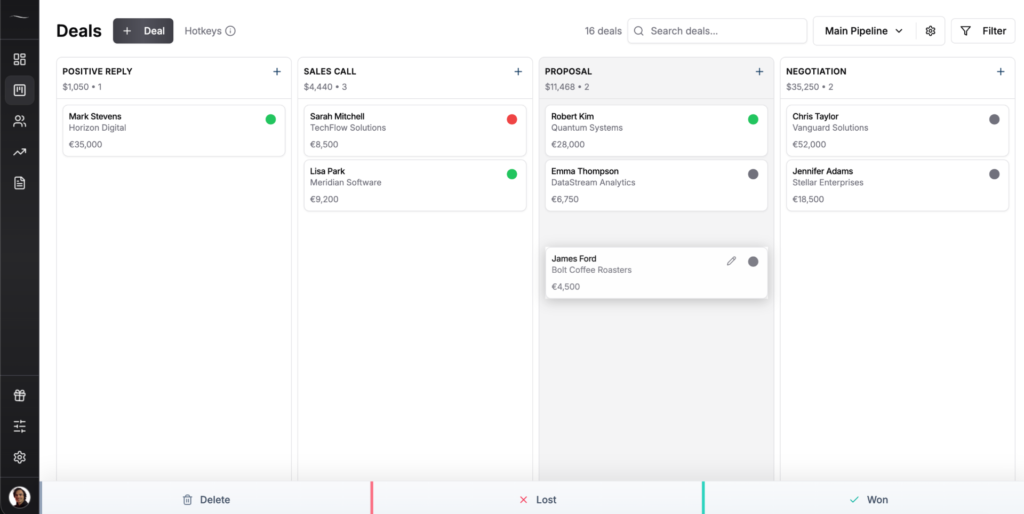
Where it falls short: It does not run jobs. No scheduling, no change orders, no job costing and no field app for the crew on site. If you need to manage the build itself, pair it with a construction platform or pick one of the tools below.
Best for: Builders, contractors and trades with 1 to 10 people in the office who quote jobs and need every enquiry and bid chased until it is won or lost.
Cost for 5 seats: $80 a month, or $720 a year on annual billing, with every feature included.
2. Pipedrive (best for a bigger sales team that needs automations)
Pipedrive is a sales CRM in the same family as Fluid CRM, aimed at teams that want deeper automation and reporting. For a construction company with a few salespeople chasing commercial bids, it gives you pipeline stages, email sync and workflow automation. Pricing runs from $14 per seat per month on Lite up to $79 on Ultimate, all billed annually, with most teams landing on Growth at $39 for email and automation. Monthly billing costs more, with Growth at $49.
Where it falls short: The cheapest plan leaves out the email sync and automations most teams want, so the real cost is higher than the sticker. Add-ons stack up fast. Like Fluid, it tracks sales, not jobs.
3. HubSpot (best for firms that also need marketing automation)
HubSpot Sales Hub is the big all-in-one most people land on after Googling “best CRM.” It’s powerful and it ties marketing, sales and service together in one place. For a construction company running real inbound marketing with the budget to match, it can fit. Starter runs about $20 per seat per month, but the features people actually buy HubSpot for, like sequences, automation and forecasting, sit on Professional at $100 per seat per month, or $90 on annual billing, plus a required one-time onboarding fee of $1,500.
Where it falls short: For a small contractor it’s overkill, and the cost climbs every time you want to do something new. You end up buying an enterprise marketing platform to track who to call back on Tuesday.
4. JobTread (best for general contractors and remodelers running jobs)
JobTread is construction management software, not a sales CRM, and that’s the point. It handles estimates, budgets, change orders, scheduling and the customer portal in one place, with a lead-tracking pipeline on the front. General contractors and remodelers like it for tying the whole job together from bid to final invoice. Pricing starts at $199 per month for the first user plus $20 for each additional internal user, with subcontractors and customers free, and there’s no onboarding fee.
Where it falls short: There’s no free trial, and the base price is steep if all you want is to track leads. If you’re not running jobs through it, you’re paying for a job platform to do a sales CRM’s work.
5. Buildertrend (best for home builders managing clients and schedules)
Buildertrend is one of the older construction platforms, built for residential home builders and remodelers who need client communication, selections, scheduling and warranty tracking. It includes unlimited users, which helps bigger teams. Pricing starts at $499 a month, and your final number depends on your annual construction volume and the onboarding package you pick.
Where it falls short: Only the starting price is public, so the real number still takes a sales call, and contractors report steep renewal increases and painful data export if they ever want to leave. Overkill for anyone whose real problem is losing bids.
6. Procore (best for larger general contractors and enterprise)
Procore is the enterprise standard for large general contractors managing big commercial projects. It covers project management, financials, quality, safety and field coordination, all with unlimited users. It doesn’t publish prices and charges a yearly fee based on your annual construction volume, so the only way to get a number is a custom quote.
Where it falls short: It’s built for contractors doing tens of millions in annual volume, not a five-person crew. If you’re searching for a CRM to stop losing bids, Procore is a different universe and a different budget.
7. Jobber (best for field service trades like HVAC and plumbing)
Jobber is field service software for trades that run lots of small jobs like HVAC, plumbing and electrical work. It handles quoting, scheduling, dispatching, invoicing and a client hub, with a mobile app the crew uses in the field. For a trade business booking jobs all day, it fits the work better than a pure sales CRM. Plans start at $29 a month for one user on annual billing, or $49 paying month to month. Plus costs $399 a month on annual billing, extra users are $29 each and there’s a 14-day free trial.
Where it falls short: Per-user pricing and add-ons add up as you grow, and it’s built around scheduled service visits, not long bid-and-quote cycles. If your work is big project bids rather than day-rate callouts, it’s the wrong shape.
8. JobNimbus (best for roofing and exterior contractors)
JobNimbus is built specifically for roofing and exterior contractors, with workflow boards shaped around a roofing sales-to-job pipeline. It blends CRM and project management so you can track a lead through to a completed roof. It doesn’t publish pricing and quotes you based on plan, users and add-ons, though it offers a 14-day free trial with no credit card.
Where it falls short: It’s niche by design, so if you’re not in roofing or exteriors the workflow won’t match your trade. Reviewers also flag a clunky mobile app, and quote-only pricing means you can’t compare without a sales call.
The Construction Sales Pipeline Most Companies Are Missing
The sales pipeline is the piece most construction companies skip, and it’s where bids quietly leak. Even contractors who buy a full construction platform often have no system for the sales side, the part that happens before a job exists. Fluid CRM (or any clean sales pipeline) turns scattered enquiries into a list you actually work.
To learn more about how to generate pipeline and how to turn that pipeline into sales, read the linked guides next.
The loop is simple. An enquiry comes in from a referral, a site sign or your website, and you log it as a deal in seconds. You send the quote and set a reminder to follow up. Three days later the reminder tells you to chase it, so the bid doesn’t die in your inbox. That’s the whole thing, and it’s the thing a notebook can’t do.
A verified Fluid CRM customer who works as a solo travel agent described the same leak in her review. “I would find myself quoting so many clients only to forget checking back on them after. Whenever I did remember, I usually would sell the trip.” Swap the trip for a kitchen extension and you have the story I saw at the construction companies I ran outbound for.
Can you name the last three enquiries you got and where each one stands right now? If you had to stop and think, that’s a bid leaking.
For the web enquiries, Fluid CRM has an embedded lead capture form you can drop on your site. The form creates the deal for you, so a quote request at 9pm is on your pipeline before you’ve had your morning coffee. No retyping, nothing lost between the contact form and the follow-up.
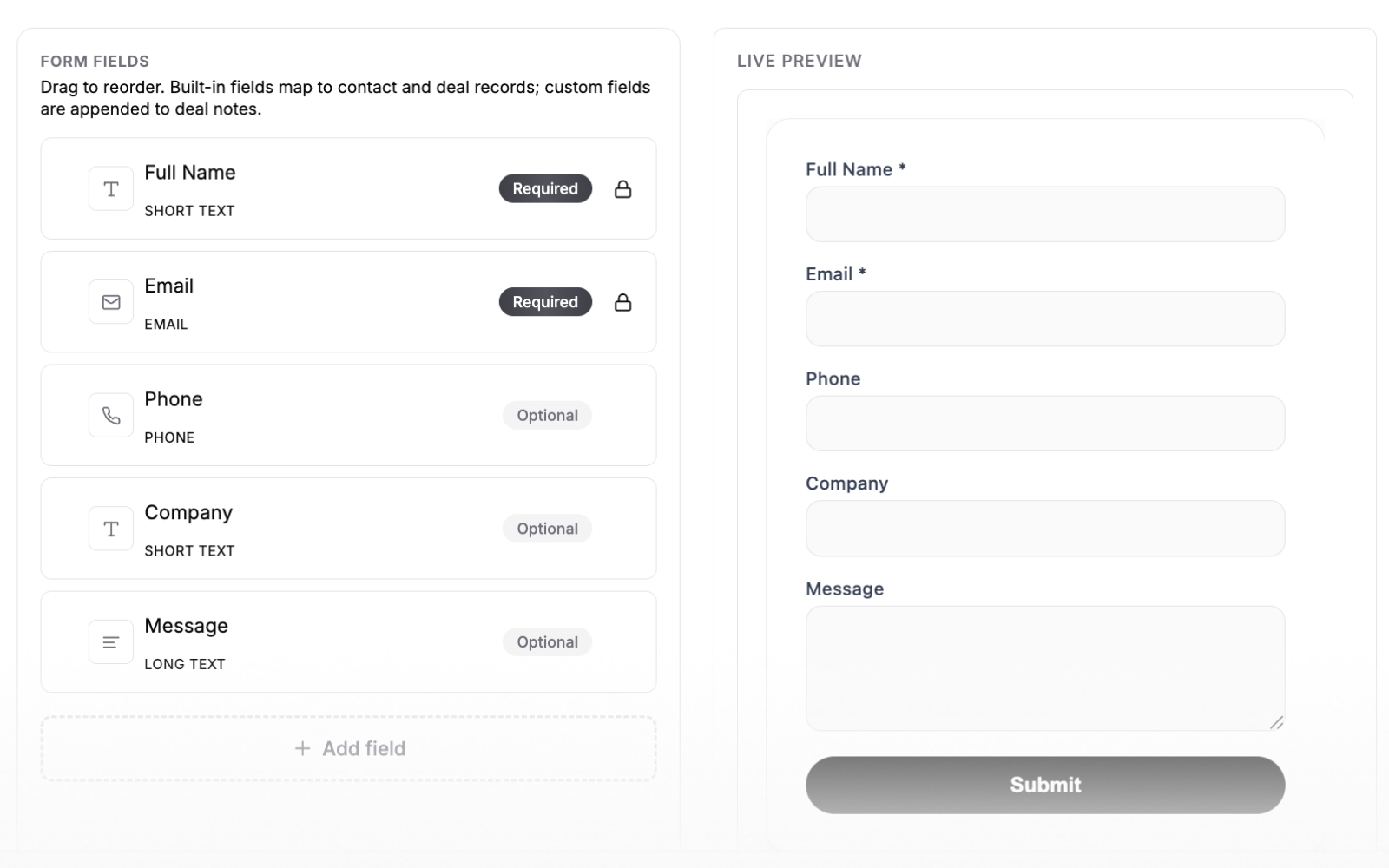
This easy step-by-step guide shows you exactly how to create lead capture forms that feed your pipeline.
Best CRM for Small Construction Businesses and Home Builders
The right CRM for a small construction business or home builder depends on who answers the enquiries and what has to happen after the contract is signed.
| If you are | Pick | Because |
|---|---|---|
| An owner-run builder or remodeler with a small office team | Fluid CRM | Your sales job is answering enquiries and chasing quotes |
| A home builder whose buyers need selections, schedules and progress updates | Buildertrend | Selections and client updates for residential builds are its core |
| A remodeler or general contractor who wants estimates, budgets and change orders in one place | JobTread | It runs the job from estimate to final invoice |
| A commercial contractor with salespeople chasing bids | Pipedrive, or Fluid CRM under 10 people | Both are sales pipelines, and Pipedrive adds deeper automation |
| A general contractor doing tens of millions a year | Procore | It is built and priced for that volume |
Home builders often have a long sales cycle. A family enquires, walks through a past project, asks for plans and comes back with changes weeks later, and the deal can die in any of those gaps. Even with a full build platform, a home builder needs one place that shows who is waiting on what.
If one person handles every enquiry, start with a simple pipeline and add construction software later. Our list of simple and lightweight CRMs covers more tools in that camp.
Best CRM for Contractors, Subcontractors and Trades
A general contractor sells differently from a home builder. Most of the work comes through bids, so the pipeline is a list of tenders and invitations to bid (ITBs), each with a due date. Plenty of those bids are lost after submission, because nobody calls the developer or architect to ask where it stands.
The relationships matter as much as the bids. The architect who sends you one ITB this year can send you five next year if you stay in touch between projects, so you need a record of every developer, architect and property manager and when you last spoke. Repeat work from those people is the cheapest work you’ll win, and our guide on how to ask for referrals covers the asking part.
Subcontractors have the same problem from the other side. An electrical or mechanical sub might price work for six general contractors in a month, and each GC is a customer with its own bid deadlines and its own way of awarding work, so every GC needs its own record with its bids underneath it.
Trades are a different case again. Electricians, plumbers, HVAC engineers and roofers (tradesmen, if you’re in the UK) often need field service software before they need a CRM. Jobber, Housecall Pro and ServiceTitan are field service software that handles scheduling, dispatch and invoicing, and a sales CRM doesn’t do that work.
The size of the job decides it. If most of your work is same-week callouts, field service software fits. If it’s larger jobs won by quote, where the customer takes weeks to decide, a sales pipeline is the part you’re missing.
Fluid CRM handles lead tracking for bid-based work. Each general contractor, developer or architect gets a company record with its deals underneath. A custom date field holds the bid due date with a reminder before it, and a lead capture form on your website turns quote requests into deals.
Fluid doesn’t do scheduling, dispatch or invoicing, so a trade business running daily callouts still needs Jobber or a tool like it.
What a Construction CRM Needs to Do Well
On the sales side, three things decide whether a construction CRM still gets opened a month after you buy it.
Stages that match how you win a job
A generic sales funnel says “qualified” and “proposal”. A builder’s pipeline says enquiry, site visit, quote sent, quote revised and won or lost, so pick a CRM where you can rename the stages in a minute. Our guide to sales pipeline stages helps if you are setting them up from scratch.
A reminder on every quote you send
Most quotes are lost after they are sent, when nobody chases them. The CRM should ask for a follow-up date on every open deal and show today’s reminders first when you open it.
Fluid CRM also emails you a daily digest of the reminders due, so the list reaches you on days you don’t log in. For what to say when you chase, use these sales follow-up email templates.
Mobile access that fits who uses it
Field crews need a native app for photos, time tracking and job notes, and JobTread, Buildertrend, Procore and Jobber all have one. The person chasing quotes mostly needs the pipeline and a phone number between site visits.
Fluid CRM has no native mobile app, but it runs in your phone’s browser. One verified customer, a solopreneur, wrote that the “mobile version is also great (inside browser) and it’s very well optimized for it.”
How to Choose Construction CRM Software
Choosing between a CRM and construction software comes down to one question. Are you trying to win more work, or run the work you’ve already won? Answer that and the tool picks itself.
Use a sales CRM like Fluid CRM if:
- Your main problem is losing track of leads, enquiries and bids
- You want to be tracking your first deal in minutes, not after a setup call
- You’re a small team or solo, and you work the pipeline yourself, not a field crew that needs a job app
- You already handle the actual job in other tools or on paper and don’t want to change that
Use a construction platform (JobTread, Buildertrend, Procore, Jobber, JobNimbus) if:
- You need scheduling, budgets, change orders or job costing in one place
- Your crew needs a mobile app on site to log photos, tasks and time
- You’re managing the full build from contract to final invoice
- You’re happy to trade fast setup for depth
Frequently Asked Questions
Some do, many don’t. If your problem is losing leads and forgetting to follow up on bids, a simple sales CRM helps. If your problem is running jobs, scheduling crews and tracking budgets, you need construction management software instead. Plenty of contractors need both, used for different jobs.
A construction CRM tracks the sales side, things like leads, enquiries, quotes and follow-ups before a job starts. Job management software runs the build itself, handling scheduling, change orders, budgets and invoicing. One wins the work, the other delivers it. Many tools blur the line, which is why buyers get confused.
For a small construction company that just needs to stop losing bids, a clean sales CRM like Fluid CRM works at $16 per seat per month with fast setup and built-in reminders. If you also need to run jobs, look at JobTread or Jobber depending on your trade. Match the tool to the bigger problem.
Yes, and a lot of contractors do. You run sales in a simple CRM and the build in a construction platform, each doing what it’s good at. Just watch for double entry. If you find yourself copying the same job into both tools, pick the one that covers more of your daily work and drop the other.
A simple sales CRM runs about $16 to $40 per seat per month. Construction platforms cost more because they do more. JobTread starts at $199 per month and Buildertrend at $499 per month, while Procore uses custom quotes based on your construction volume. The right number depends on whether you’re paying to win work or run it.
It depends on which part of the work goes wrong. If enquiries and quotes go unanswered, a simple sales CRM like Fluid CRM at $16 per seat per month fixes that part. If the pain is selections, schedules and homeowner updates during the build, Buildertrend is made for residential builders and starts at $499 per month.
For tracking bids, ITB due dates and follow-ups with developers and architects, a sales CRM like Fluid CRM or Pipedrive fits. To run the jobs you win, with estimates, budgets and change orders, look at JobTread, or Procore for large commercial work. Many general contractors use one of each.
Which Construction CRM Should You Pick
Construction software does two jobs, and the tool that runs your builds is rarely the tool that wins them. Work out which problem is costing you more, then pick for that. If you’re losing bids to a sticky note or a forgotten follow-up, Fluid CRM gives you a clear visual pipeline you can set up in minutes.
Start your 7-day free trial here, no credit card required.