

An owner told you two years ago to call when his tenant’s lease comes up. That date is now in your head, or in a spreadsheet tab nobody has opened since spring. This list covers five tools for that brokerage problem plus Fluid CRM, compared by what each one stores and what it costs a small shop.
The best CRM for commercial real estate depends on where you keep property data. ClientLook, AscendixRE, Buildout and RealNex hold property records and comps inside the CRM. Fluid CRM ($16 per seat per month) fits a small brokerage that keeps them elsewhere and tracks owners, tenants and referrals on a pipeline.
6 Commercial Real Estate CRMs by Property Data and Price
Six commercial real estate CRMs, compared by property records and price.
| CRM | Best for | Starting price | Cost for 5 seats | Property and comp records | Limit to know |
|---|---|---|---|---|---|
| Fluid CRM | A small brokerage that keeps property data elsewhere | $16 per seat a month, or $144 per seat a year | $80 a month or $720 a year | No | One contact per deal |
| ClientLook | A small team that wants property data ready to import | $89 per user a month billed annually, or $129 monthly | $445 a month billed annually | Yes | $129 a month without an annual commitment |
| AscendixRE | A brokerage happy to run on Salesforce | $79 per user a month, billed annually | $395 a month | Yes | Runs on Salesforce, so someone has to own the setup |
| Buildout | A firm that wants marketing, CRM and back office together | From $125 per user a month | From $625 a month plus platform maintenance | Yes | Email marketing is an add-on |
| RealNex | A broker who wants lease alerts on property profiles | Per user, by module | Depends on modules | Yes | One-time implementation fee per user on most plans |
| HubSpot | A shop that emails an owner list | Free for up to 2 users, Starter $20 per seat billed monthly | $100 a month on Starter | No | Professional requires a one-time $1,500 onboarding fee |
1. Fluid CRM
Fluid CRM is the sales pipeline we built for small B2B teams, and it has no property records. It has unlimited pipelines, a reminder on each deal, a morning email of what’s due and custom fields for text, numbers and dates.
An owner’s deal holds one contact, so the asset manager and the attorney go in the notes, and comps stay in your other system. Ritz Steytler at Abacus Partners put the scope fairly:
“It really is all you need (mostly!) and nothing you don’t (almost!).”
Our consulting CRM page shows the same board, reminders and daily digest for people who sell by conversation, which is most of a broker’s week.
- Best for: a 1 to 10 person brokerage tracking owner, tenant and referral relationships.
- Not for: a firm that wants comps, stacking plans and offering memorandums, the documents that market a property, in one system. Fluid CRM is not the tool for it.
- Cost for 5 seats: $80 billed monthly, or $720 billed once a year. There is one plan with every feature in it.
2. ClientLook
ClientLook is now a LightBox product, built for commercial brokers who want data on day one. You can import property records from LightBox, add sale and lease comps to them and turn a closed listing into a comp.
It tracks listings and tenant requirements in one pipeline view, with a deal room for files and emails. It costs $1,068 per user a year or $129 month to month, and there is a 10-day free trial.
- Best for: a small team that wants property records from the start.
- Not for: a shop whose comps are already kept in a system it trusts.
3. AscendixRE
AscendixRE is a commercial real estate layer on top of Salesforce, with the Salesforce license included in the price. Foundations starts at $79 per user a month and Enterprise at $99, both billed annually.
- Best for: a brokerage with someone who will own the configuration, since a Salesforce base needs someone to maintain it.
- Not for: a two-person shop with nobody to do that.
4. Buildout
Buildout sells the whole brokerage workflow: proposals, offering memorandums, property websites, listing syndication, a CRM, comps, commissions and invoicing. Solutions start at $125 per user a month, and the final price also includes platform maintenance.
Buildout bought both Rethink and Apto, so older lists name those products on their own.
- Best for: a firm where marketing listings takes up a big part of the week.
- Not for: a broker who only needs contacts, deals and dates.
5. RealNex
RealNex keeps its CRM in a module called KRM, which links owners, tenants and lenders to property profiles with floor plans and stacking plans. It sends alerts months ahead of a lease expiration and shows deals on a kanban board.
Pricing is per user, with annual or monthly billing and a one-time implementation fee per user on most plans.
- Best for: a broker who wants lease alerts attached to the property record.
- Not for: a shop that wants to start with no setup fee.
6. HubSpot
HubSpot has no property records either, and its strength for a brokerage is email marketing to an owner or investor list. The free plan covers up to 2 users and Starter is $20 per seat billed monthly.
Professional is $90 per seat billed annually or $100 billed monthly, plus a required one-time onboarding fee of $1,500.
- Best for: a shop whose main outreach is email to a list.
- Not for: a brokerage that wants comps or property records in its CRM.
How to Choose a Commercial Real Estate CRM
A brokerage CRM can hold two kinds of information. One is property data: buildings, floor plans, sale comps, lease comps and who owns what. The other is who to call and when: the owner who said “not yet”, the tenant whose lease ends in two years, the attorney who sends you work.
The commercial real estate platforms above handle both, so why wouldn’t you pay for one tool that does it all? The answer depends on three things.
Where your property data is kept today
If comps are already in a data subscription or a shared sheet your team trusts, a second property database gives you two places to update.
Who will keep comps entered
A 20-person shop may have a research person. In a three-person shop, it is whoever is free on Friday afternoon.
Whether your marketing pulls from the CRM
If offering memorandums and property websites should draw on the same records, an all-in-one platform is worth paying for.
A small shop can start with the calling side and add property software later.
If you sell companies rather than buildings, the CRM list for business brokers covers NDAs and data rooms instead.
When to Start Calling Before a Lease Expires
Lead time is where commercial leasing differs from most B2B selling. One Manhattan tenant broker’s rule says when an office tenant should start looking, based on the size of the deal. To win that tenant, you need to be talking to them before the search starts.
Here is that rule, next to a first call date we suggest. Our column adds three months to the earliest start, so treat it as a starting point and adjust it for your market.
| Office tenant | When the tenant should start | Suggested first call, before the lease ends |
|---|---|---|
| Under 5,000 square feet, prebuilt or as-is | 9 to 12 months out | 15 months |
| 5,000 to 25,000 square feet with a build-out | 12 to 18 months out | 21 months |
| 25,000 square feet or anything custom | 18 to 24 months out | 27 months |
Take a 4,000 square foot tenant on a prebuilt floor, with 30 months left on the lease. You open a deal for them today, record the expiration date and set a reminder for 15 months before it. The tenant then shows up in your morning email on that day, even if you have forgotten the conversation.
Leads die on the days the CRM stays closed, and with a wait of a year or more, that is most days. The morning email still shows the reminder on its due date, so weigh how simple each tool is to keep up to date as heavily as anything on its feature list.
Peter Duffy, on a small B2B team, says Fluid CRM “makes keeping the CRM up to date far less of a chore”.
Booking 1,250+ sales calls for other firms at Fenixtal, my old outbound agency, taught me that “not now” rarely means no. “Call me when the lease is up” is the commercial version, and it only pays if a date goes with it.
Owner, Tenant and Referral Pipelines for a Commercial Brokerage
If you run the relationship side in Fluid CRM, three sales pipelines cover most of it. Each one holds a different kind of conversation, and the stages use the words you already say out loud.
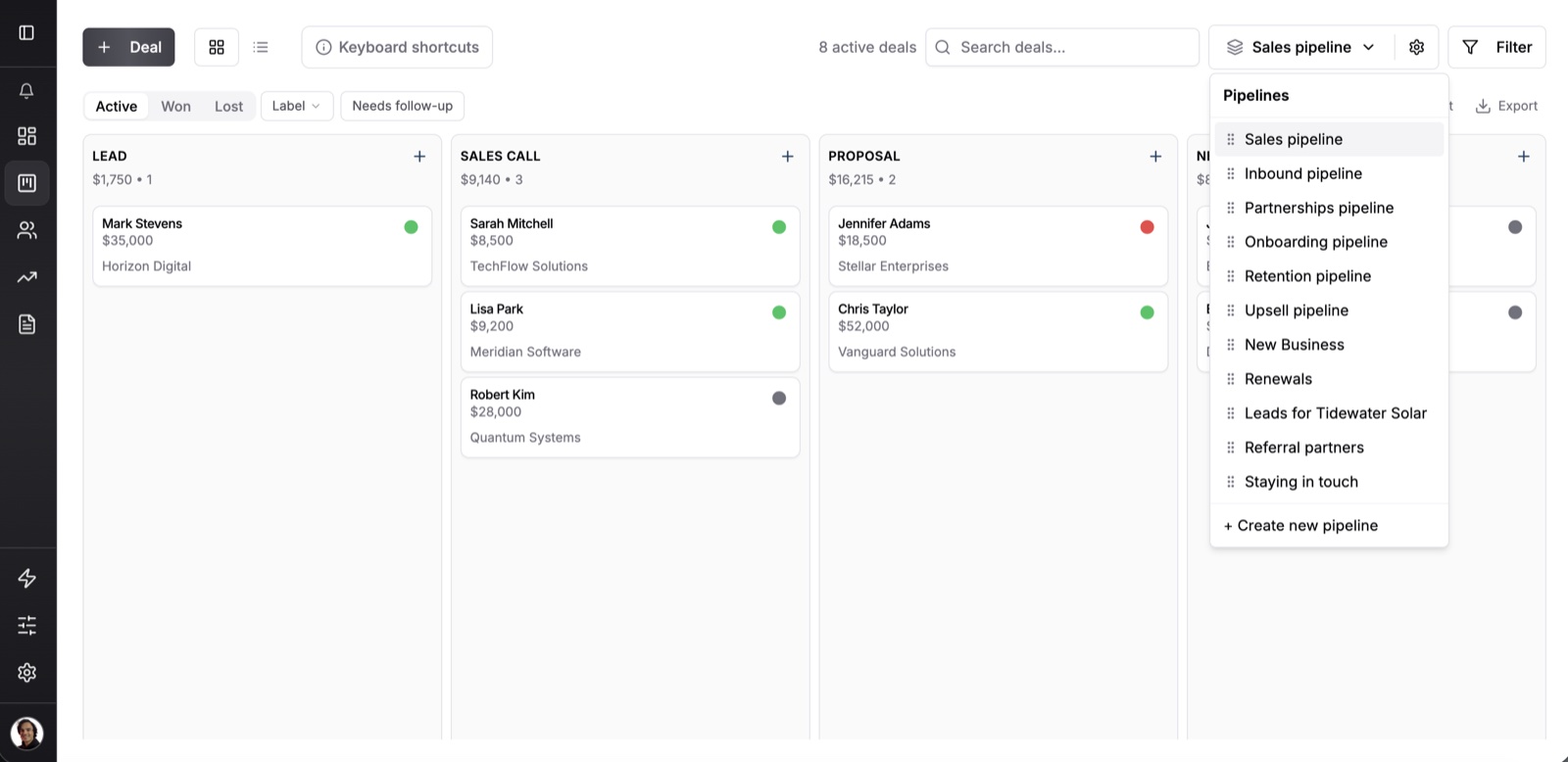
Owner and listing pipeline
Owner identified, First conversation, BOV sent, Listing signed, On market, LOI, Under contract. A BOV is a broker opinion of value and an LOI is a letter of intent.
Use your expected commission as the deal value rather than the sale price, so the numbers on the board are your income.
Tenant rep pipeline
Lease watch, First call, Rep agreement signed, Tours, Proposals, Lease negotiation. Lease watch is where the long wait happens, and a deal can wait there for a year or more with one date attached.
Fluid CRM runs in your phone’s browser with no app to install, which helps between tours. You can also log tour notes through Claude or ChatGPT with the MCP connector, which links the CRM to those assistants.
Referral partner pipeline
Attorneys, lenders, accountants and property managers often send a small brokerage work, and each of them gets a deal so there is somewhere to keep a date.
Our guide on how to ask for referrals has the wording, and the one on how to keep in touch with clients covers the check-ins. A solo broker on commission may also want the CRM list for independent sales reps.
Custom fields to add
Add a date field for lease expiration, number fields for square footage and commission rate and text fields for submarket and building. Star up to four of them so they show on the deal card. Fields are set per pipeline, so tenant details stay off your owner deals.
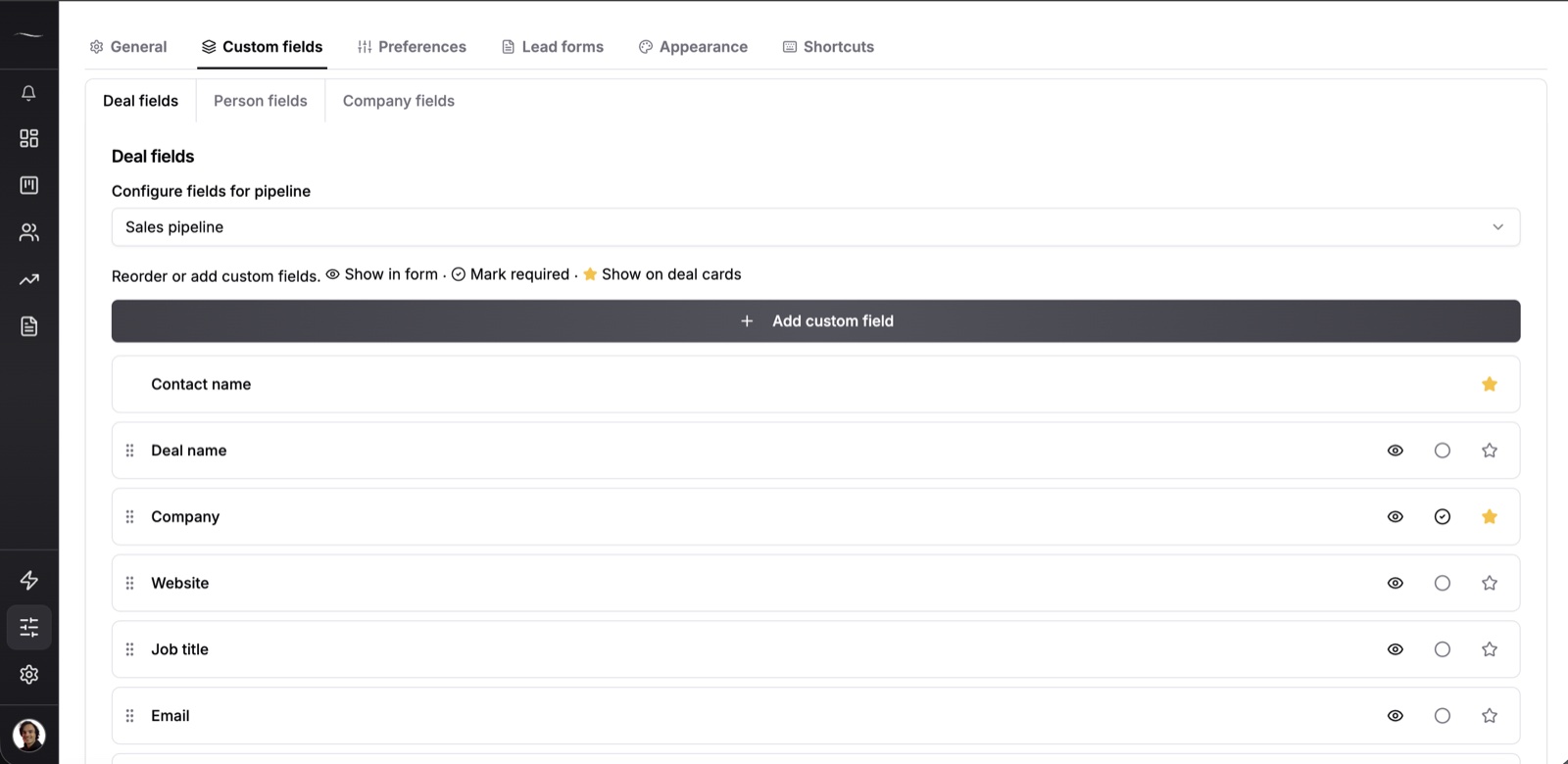
When you open a deal, set the reminder from the lease table, then set the next date after each call. Open the deal the day an owner says “call me when the lease is up”, because that is where the date is kept.
What to Do With a Deal After the Lease Is Signed
A signed lease is also the start of the next one. In Fluid CRM you mark the deal won and it keeps its reminders, so you can set one for when that tenant’s next renewal window opens. It appears in the morning email with a small “Won” tag.
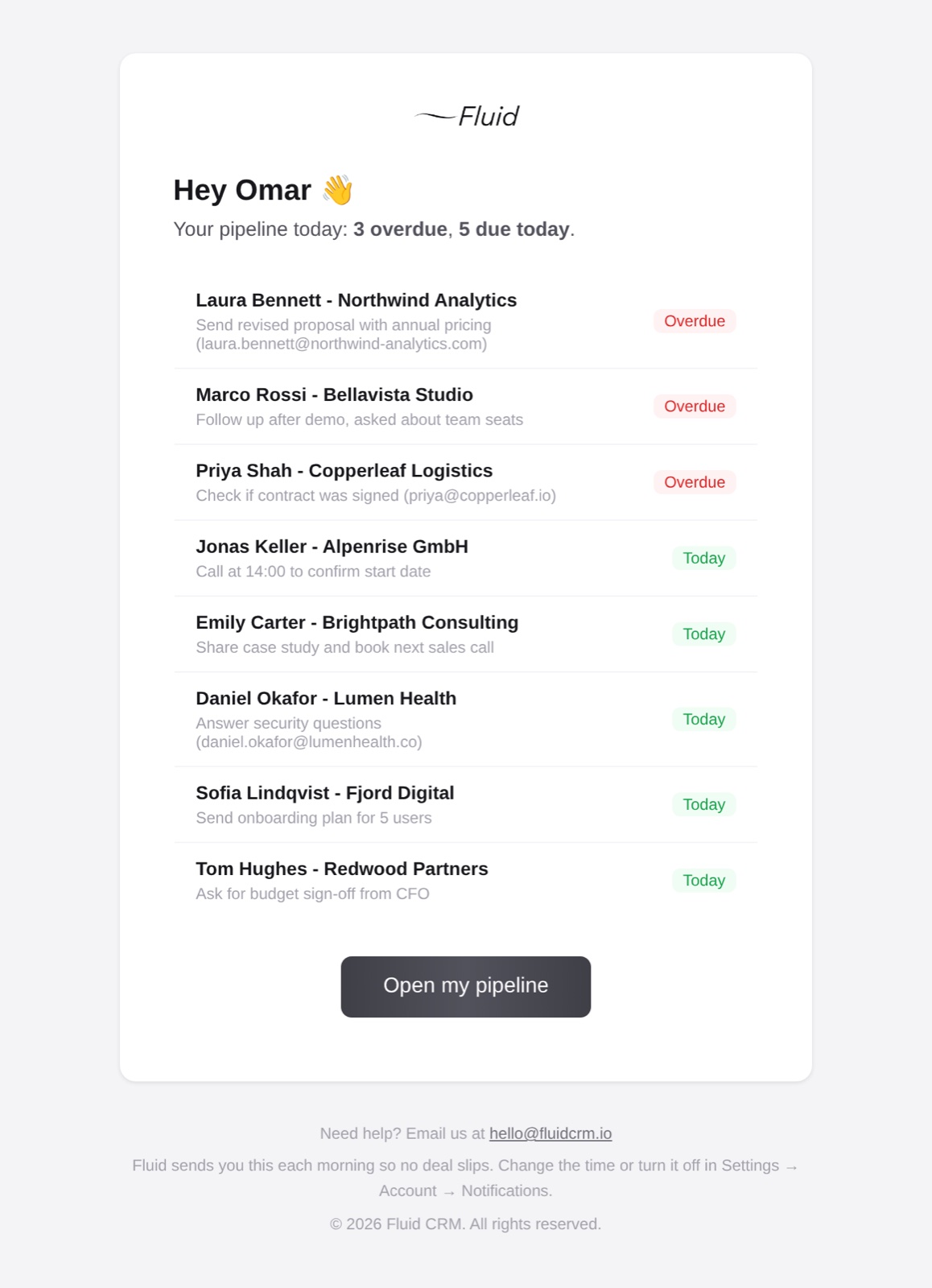
You can correct a won or lost deal’s close date to the day it really signed, so your results by month stay accurate.
Marking a deal lost asks for a reason, and the workspace owner can rename the list to fit brokerage, such as “stayed put”, “fee too high” or “went with another broker”.
After a year, the lost reasons report tells you whether you lose on fees or on timing. If you lost on timing, set a new reminder on the lost deal for the next lease cycle.
Commercial Real Estate CRM FAQ
A commercial real estate CRM is software that tracks the people and deals in a commercial brokerage, usually alongside property records, comps and lease dates. General CRMs track the people and deals only. The right type depends on whether you already keep property data somewhere else.
Published prices for the platforms here run from $79 to $129 per user a month, and some add maintenance or implementation fees. For five seats, that means roughly $395 to $645 a month at the plans listed. Fluid CRM costs $80 a month for five seats but has no property records.
Yes, if comps and property data stay in another system you trust. A general CRM handles owner calls, tenant lease dates and referral partners well once you add custom fields. It won’t give you stacking plans, comp reports or offering memorandums.
HubSpot has a free plan for up to 2 users, with no property records. Fluid CRM has no free plan, and it offers a 7-day free trial with no credit card required. The commercial real estate platforms here are paid, and ClientLook has a 10-day trial.
Start With the Lease Date When You Pick a CRM
Pull the expiration dates you already know and count how many have a next call attached. If comps are the gap, Fluid CRM is not the tool for it. If the calls are the gap, Fluid CRM is the simpler fix, and the consulting CRM page shows the setup for people who sell by conversation.
Start your 7-day free trial here, no credit card required.