

A buyer signed your NDA three weeks ago, got the CIM and has not heard from you since. Meanwhile the seller wants an update on Friday. Every listing has a seller side and a buyer side, and most CRMs only show you one of them. This list covers broker platforms and Fluid CRM, with what each one leaves out.
The best CRM for business brokers depends on your deal flow. Tupelo or DealRelations fit a brokerage that needs automatic NDAs, data rooms and listing-site inquiries. Fluid CRM ($16/seat/month) fits a 1 to 5 person firm that wants listings and buyers on two linked boards with a follow-up date on every buyer.
The 6 Best CRMs for Business Brokers at a Glance
Each price is the cheapest plan that does the job, for 5 seats. We built Fluid CRM, so it is on the list with its limits in the table like everyone else’s.
| CRM | Best for | Starting price | Cost for 5 seats | Broker tools built in | Limit to know |
|---|---|---|---|---|---|
| Fluid CRM | A 1 to 5 person brokerage that wants both sides on simple boards | $16 per seat a month, or $144 per seat a year | $80 a month or $720 a year | None | No e-signature, data room or listing syndication |
| Tupelo | A purpose-built broker CRM with its own marketplace | Quote only | Quote only | NDAs, data room, e-signature | Pricing comes through the sales team |
| DealRelations | NDA and data room workflows at a published price | $99 per user a month | $495 a month before the team discount | NDAs, data room, e-signature | Demo first |
| Deal Studio | A website, listing marketing and CRM from one provider | Quote only | Quote only | Website, listing marketing, deal management | Pricing comes through a conversation with the team |
| Pipedrive | A general CRM with e-signatures in the same tool | $14 per seat a month on Lite, billed annually | $195 a month on Growth, $295 on Premium | E-signatures on Premium | Built for one-sided sales |
| HubSpot | Email marketing to a buyer list | Free for up to 2 users, Starter lists at $20 per seat | $100 a month on Starter | None | Professional requires a one-time $1,500 onboarding fee |
| Google Sheets or Excel (baseline) | Fewer than about 10 active buyers | $0 | $0 | None | A spreadsheet never reminds you |
If you have an advisory firm that sells expertise rather than businesses, our consulting CRM page covers that buyer. This list is for brokers and small M&A advisors who sell companies on behalf of owners.
Features to Look For in a Business Broker CRM
One listing can have twenty buyers at five different stages, and the deal takes months. These are the features that matter, with the platform-only ones marked.
My agency, Fenixtal, booked 1,250+ sales calls for other companies, and the pattern I saw from the outside was the same almost every time. Leads rarely died at the first meeting. They died in the weeks after it, when nobody owned the next step, and brokerage deals have far more of those weeks.
1. Two sides of every deal
The seller and the listing sit in one place and every buyer in another, linked to the right listing. A CRM that only knows “deals” pushes twenty buyers into a notes field.
2. The NDA gate
Nothing confidential leaves your hands before a signed NDA. The CRM should show who signed and when, so the CIM goes to the right people and nobody else.
3. A follow-up date on every open buyer
Deals take months, and most of that time is quiet. Every buyer who has your CIM needs a next-contact date, or they slide to the bottom of the list.
How many buyers have your CIM right now, and when did you last speak to each one?
4. Confidential naming and access
Use a codename for each listing, so the seller’s name never shows on a card or in a teaser. In a team, each person should see only the boards they work on.
5. E-signature (platform only)
Broker platforms send the NDA and collect the signature for you. A general CRM leaves this to DocuSign or a similar tool.
6. A data room (platform only)
A data room gives each buyer access to the financials after the NDA, and logs what they opened. General CRMs do not have one.
7. Listing-site inquiry capture (platform only)
Platforms pull inquiries from listing sites and fire the NDA automatically. If most of your buyers arrive this way, that feature alone can justify the price.
The 6 Best CRMs for Business Brokers, Reviewed
Each review ends with the same three lines.
1. Fluid CRM (best for a 1 to 5 person brokerage)
Fluid CRM is a sales CRM with one plan. Every feature is included, and there is a 7-day free trial with no credit card required. You get unlimited pipelines, labels, custom fields, a reminder on every deal, a daily digest email of what is due and lead capture forms for your website.
For a broker that means a Listings board and a Buyers board side by side, with a label tying each buyer to a listing.
A verified Fluid CRM customer who coordinates about 80 coaches in a European network keeps seven pipelines. The work is not brokerage, but the shape is the same, with parallel boards that each need their own stages.
“Most CRMs treat pipelines as a sales funnel and nothing else. FluidCRM lets you run multiple pipelines side by side, each with its own stages, automations and labels.”
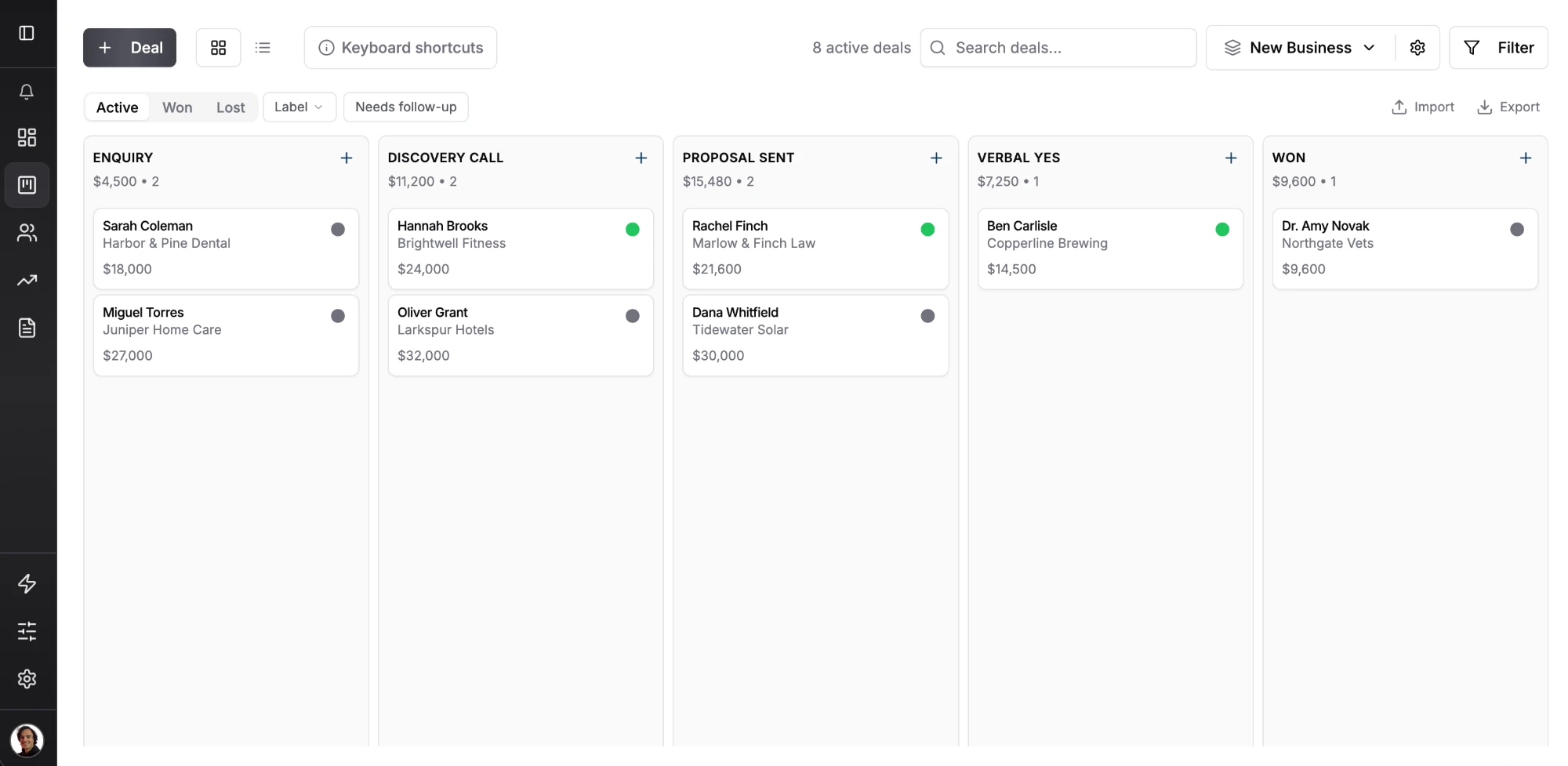
- Best for: a broker or small M&A advisory team with up to a few dozen active buyers who wants every buyer on a board with a date.
- Not for: firms that need NDAs e-signed automatically, a data room or listing syndication. There is no mobile app (it works in your phone’s browser), email is logged by BCC with no two-way sync and one deal holds one contact.
- Cost for 5 seats: $80 a month, or $720 a year on annual billing.
2. Tupelo (best purpose-built broker CRM with a marketplace)
Tupelo is built for business brokers and M&A advisors. It sends NDAs automatically when a prospect inquires on a major listing site, and it includes a data room, e-signatures, email marketing, smart forms and automated valuations. It also has a marketplace where buyers sign NDAs to see listings.
- Best for: a brokerage with a steady flow of listing-site inquiries that wants NDAs and the data room handled for it.
- Not for: a one-broker shop with a few listings that mainly needs follow-up dates.
- Cost for 5 seats: quote only. The site sends you to “Talk to Sales”.
3. DealRelations (best for NDA and data room workflows at a published price)
DealRelations is a CRM for business brokers and M&A advisors with document management, electronic signatures, automated NDA emails, virtual data rooms and email marketing. Its Complete Solution plan is $99 per user a month, with discounts for teams of 4 or more.
- Best for: a firm that wants the full broker toolkit and likes knowing the price before the demo.
- Not for: a broker who wants to try the tool alone first, since the main route in is a demo request.
- Cost for 5 seats: $495 a month before the team discount.
4. Deal Studio (best when you also want a website and listing marketing)
Deal Studio combines a broker website, a CRM, marketing and deal management. Its deal management side is DealBuilder. The platform also offers lead capture tools, listing promotion and custom builds for brokers with their own process.
- Best for: a brokerage that wants one provider for its website, listing marketing and CRM.
- Not for: a firm that already has a website it likes and only needs a pipeline.
- Cost for 5 seats: quote only, through a conversation with their team.
5. Pipedrive (best general CRM with e-signatures built in)
Pipedrive is a visual sales CRM with a 14-day free trial. Growth at $39 per seat a month on annual billing adds full email sync, and Premium at $59 adds contracts and e-signatures. Our Pipedrive pricing breakdown covers the add-ons.
- Best for: a broker who wants email sync and NDA signing in one general-purpose CRM.
- Not for: anyone who wants a data room or listing-site capture without connecting other tools.
- Cost for 5 seats: $195 a month on Growth or $295 a month on Premium, billed annually.
6. HubSpot (best if email marketing to buyers matters most)
HubSpot has a free CRM for up to 2 users. Sales Hub Starter lists at $20 per seat a month, and Professional is $90 per seat a month on annual billing plus a required one-time onboarding fee of $1,500.
- Best for: a brokerage that sends regular new-listing emails to a large buyer database.
- Not for: a small firm that wants a broker workflow without building it from scratch.
- Cost for 5 seats: $100 a month on Starter at list price, or $450 a month on Professional plus the one-time $1,500 onboarding fee.
How to Set Up Listings and Buyers as Two Pipelines
This works in Fluid CRM and in most pipeline CRMs. It covers the part of brokerage where deals die most often in a small firm, the stretch between NDA and LOI.
Step 1. Build a Listings board
One card per business you are selling, named with its codename. Stages: Valuation, Engagement signed, Marketing, Under LOI, Due diligence, Closed. Put the asking price in the deal value so the board totals your listed value.
Step 2. Build a Buyers board
One card per buyer per listing. Stages: Inquiry, NDA sent, NDA signed, CIM sent, Meeting held, LOI submitted, LOI accepted. A buyer looking at two of your listings gets two cards, because they sit at different stages.
Step 3. Tie each buyer to a listing with a label
Give every buyer card a label such as “Listing:Project-Oak”. Filter the Buyers board by that label and you see every buyer for one listing in one click. The coaching network customer above uses the same Category:Value label pattern to keep seven pipelines sorted.
Step 4. Add three custom fields
Add NDA signed date (date), proof of funds (text) and target close (date) to the Buyers board. In Fluid CRM, fields are set per pipeline and can be marked required, so the Listings board stays clean.
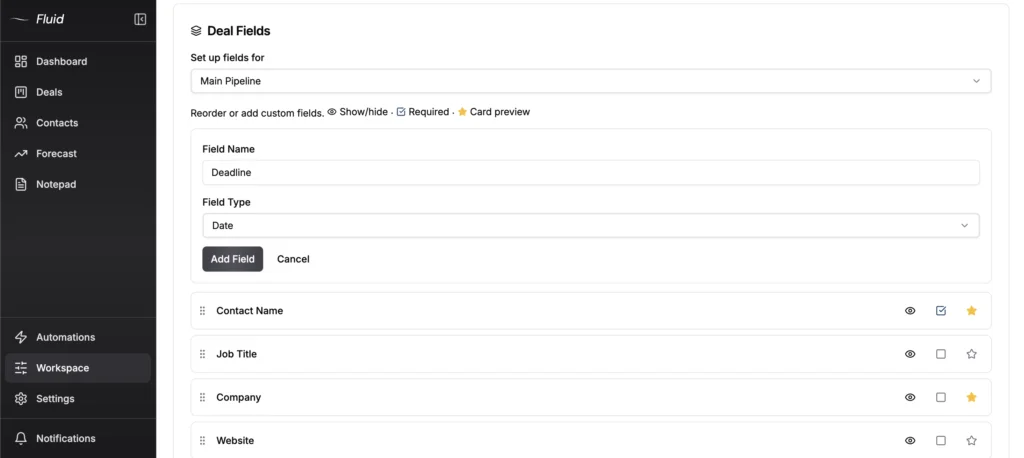
Step 5. Put a date on every buyer
Set the next follow-up date the moment you send the NDA, and again when you send the CIM. The daily digest email lists the buyers due that day, so a quiet buyer shows up in your inbox before they disappear.
Step 6. Catch inquiries from your own site
Put a lead capture form on each listing page of your website. It creates the buyer contact and a deal in the Inquiry stage, and an automation can set a reminder on every new lead. Our list of CRMs with built-in lead capture forms compares the options.
When a buyer reaches LOI accepted, move the listing card to Under LOI yourself.
Buyers who pass on one business are worth keeping for the next. Add a Passed stage to the Buyers board and let an automation move anyone who lands there to a Buyer pool board, history attached. That same customer says this kind of cross-pipeline move works “exactly as you would expect.”
Advisors who also raise capital for clients will find the same shape in an investor pipeline, and solo advisors can compare picks in our guide to the best CRM for consultants. If your sellers come to you through their accountants, the best CRM for CPA firms shows how those firms track referrals.
When You Need a Dedicated Broker Platform Instead
Buy a broker platform instead of a general CRM if any of these describe you.
- Buyer inquiries arrive from several listing sites every day, and you want the NDA sent without touching it.
- You need a data room with access per buyer and a log of what each one opened.
- You want buyer matching or automated valuations inside the CRM.
- You need e-signed NDAs and a buyer list emailed from the same tool.
Fluid CRM does none of those four. It also has no mobile app, no two-way email sync and one contact per deal, so a buyer group with three partners means three notes or three cards. Larger M&A firms with bankers, lenders and formal diligence teams usually look at enterprise deal software, which is outside this list.
James, a small business owner on Fluid CRM, named the trade-off and his workaround: “The tool is designed around deals, rather than contacts, but a work-around is to set up deals for contacts that include an on-going relationship step.”
My rule of thumb is to count two numbers, your active listings and your new buyer inquiries per week. A handful of listings and a few inquiries a week is a follow-up problem, and a pipeline fixes it. Our guide to CRM ROI shows how to check that it pays for itself.
Dozens of inquiries a week across many listings is an automation problem, and that is what Tupelo, DealRelations and Deal Studio are for. The IBBA keeps a supplier directory of broker software vendors if you want a longer list.
Business Broker CRM FAQ
It depends on volume. Tupelo and DealRelations suit brokerages that need automatic NDAs, data rooms and e-signatures, and Deal Studio suits firms that also want a website built. Fluid CRM suits a 1 to 5 person firm that mainly needs every buyer on a board with a follow-up date.
Yes. Both handle pipelines well, Pipedrive Premium adds e-signatures and HubSpot is strong on email marketing to a buyer list. Neither has a data room or listing-site capture built in, so you would connect other tools for those.
Only if you share financials with many buyers at once and want to log who opened what. A small firm can share a protected folder after the NDA is signed and track the date in the CRM.
Use two pipelines. Put listings on one board and buyers on another, then tag each buyer with a label for the listing they want, so you can filter one listing’s buyers in a click.
For 5 seats, Fluid CRM costs $80 a month, Pipedrive Growth $195 a month on annual billing and DealRelations $495 a month before its team discount. Tupelo and Deal Studio quote prices through their sales teams.
Which CRM a Small Brokerage Should Pick
If listing sites send you dozens of inquiries a week, pick Tupelo or DealRelations and let the platform send the NDAs. If you have a handful of listings and the real risk is a buyer nobody called back, Fluid CRM gives you two boards and a date on every buyer for $16 per seat a month. Advisory firms that sell their expertise can start from our consulting CRM page instead.
Start your 7-day free trial here, no credit card required.