

Learning how to check MX records takes about a minute, and you do not need permission to do it. Every domain that receives email has an MX record and that record is public. Which means you can find out whether a company runs Gmail, Outlook, Zoho or an enterprise filter that kills most of it on arrival.
Most posts about MX records teach you how to set one up. This one teaches you how to read one. You get the 3 ways to check any domain using the free bulk MX lookup tool, a table that turns a hostname into a provider name and my honest take on which providers are brutal to cold email after 3 years of doing it at Fenixtal.
To check a domain’s MX records, run the domain through an MX lookup tool, or use nslookup -q=mx domain.com on Windows and dig domain.com MX +short on Mac or Linux. The hostname in the result tells you which provider hosts that domain’s email.
What Is an MX Record?
An MX record is a DNS setting that tells the rest of the internet which server should receive email for a domain.
MX stands for Mail Exchanger. When someone sends a message to hello@yourcompany.com, their mail server asks DNS one question first. Where do I drop this? The MX record is the answer.
Think of a big office building. The street address gets the courier to the front door, but the courier still needs the mailroom to sort the delivery. Your domain is the street address. Your MX record is the sign on the mailroom door telling the courier which desk to hand the mail to.
Two rules matter when you read one. An MX record points to a hostname like mail.example.com, never to an IP address. And that hostname cannot be a CNAME, which is a rule written into the DNS spec itself. Plenty of broken mail setups trace back to somebody ignoring that second rule.
A domain can have several MX records at once. That is normal and it is how failover works, which I cover further down.
How To Check MX Records for Any Domain (3 Methods)
Checking MX records takes under a minute, and you do not need access to the domain to do it. MX records are public DNS data, so you can look up any domain you like, including a prospect’s. Here are the 3 ways, fastest first.
Method 1: Use an online MX lookup tool (fastest)
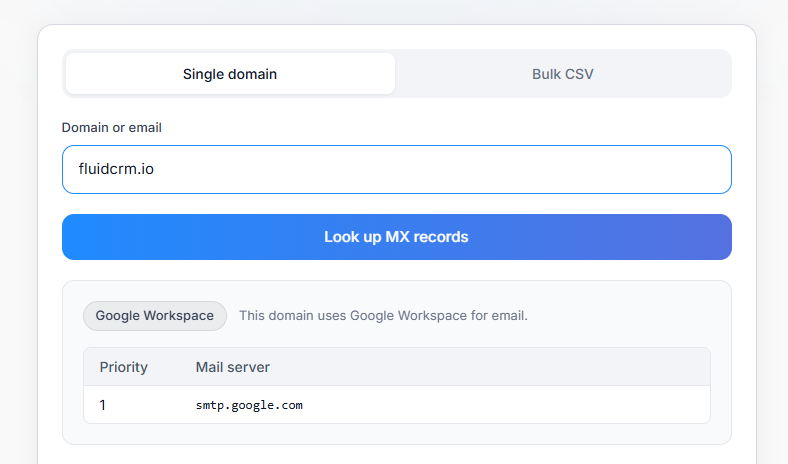
- Open the free bulk MX lookup tool (it can lookup individual domains and emails too)
- Type the domain on its own, with no
wwwand nohttps:// - Press check and read the host column
The host column is the part that matters. Everything else on the screen is supporting detail.
Method 2: Run it from the command line
If you live in a terminal, this is quicker than opening a browser.
On Windows:
nslookup -q=mx example.comOn Mac and Linux:
dig example.com MX +shortThe dig version gives you the cleanest output, usually two columns. The number on the left is the priority and the text on the right is the mail host. The nslookup version prints the same information with more words around it.
Method 3: Check your DNS provider dashboard
This one only works for domains you own. Log into Cloudflare, Namecheap, GoDaddy or wherever your DNS lives, open the DNS records section and filter for MX.
One catch that trips people up. The dashboard shows what you saved, not always what the world can see. If you changed a record 10 minutes ago, the dashboard says done while half the internet is still serving the old answer from cache. When you want the truth, check from outside with method 1 or 2.
What Your MX Record Actually Tells You
The hostname inside an MX record is a fingerprint. Every major email provider uses its own hostname pattern, so once you know the patterns you can name the provider on sight without asking anyone.
| If the MX record contains | Email is hosted on |
|---|---|
| aspmx.l.google.com or googlemail.com | Google Workspace (Gmail) |
| mail.protection.outlook.com | Microsoft 365 / Outlook |
| mx.zoho.com or mx.zoho.eu | Zoho Mail |
| *.pphosted.com or *.ppe-hosted.com | Proofpoint security gateway |
| *.barracudanetworks.com | Barracuda security gateway |
| *.mimecast.com | Mimecast security gateway |
| mx1.privateemail.com | Namecheap Private Email |
| in1-smtp.messagingengine.com | Fastmail |
| mx.yandex.net | Yandex |
| A local or country-specific host | Regional provider or self-hosted |
| No MX record at all | No dedicated email host, red flag |
That last row needs a closer look. When a domain has no MX record, sending servers fall back to its A record and try to deliver there instead. That almost never works, because a parked domain or a plain website server is not running a mail service. Sometimes the missing record is on purpose, because the domain redirects somewhere else or exists only to stop somebody else registering it. Sometimes it is a mistake nobody has noticed yet. Either way, treat that address as undeliverable and pull it before you send.
Why the Email Provider Matters for Cold Email
The provider behind a domain changes how hard it is to land a cold email in the inbox. Same message, same sending domain, same warmup, different provider, different result.
In 3 years running cold email at Fenixtal I sent for 50+ B2B clients across marketing agencies, dev firms, construction companies and compliance companies. 1,000+ meetings booked, 12M€+ in pipeline. The thing that surprised me most had nothing to do with copy. Two lists with the same offer and the same sender would perform completely differently, and the split kept coming down to where those mailboxes lived.
| Provider | Difficulty | Why |
|---|---|---|
| Gmail / Google Workspace | Easiest | Most forgiving of the majors |
| Zoho, Fastmail, regional hosts, custom SMTP | Moderate | Smaller, less aggressive filters. Often easier than Outlook |
| Microsoft 365 / Outlook | Hard | Strict, many signals, more sensitive than Gmail |
| Proofpoint, Barracuda, Mimecast | Hardest | Enterprise gateways sitting in front of the mailbox, very aggressive |
Most people assume the giant providers are the strict ones and the small regional hosts will let anything through. That is half right. Gmail is the biggest and the most forgiving of the lot. Outlook is the wall. Microsoft tenants are where I saw the most silent filtering, the kind where nothing bounces and nothing lands anywhere the prospect will ever look.
The gateway rows tell you something extra. If a domain sits behind Proofpoint, Barracuda or Mimecast, that company was big enough to buy a separate security layer for its email. You are not just looking at a hard filter, you are looking at a company with a procurement process and an IT department.
So the practical use is simple. Before you send to a list, check what the MX records say about it. A list full of pphosted.com and barracudanetworks.com means expect a fight, warm up harder and lower your daily volume. A list that is mostly Gmail means you can move faster. If you are running this kind of outreach as a service, the same logic applies to how you track replies in a CRM built for cold email agencies and how you set up a pipeline for outbound work.
Take the last list you sent to. How many of those domains were sitting behind Outlook or a gateway? If you have no idea, that is the whole problem in one sentence.
One honest caveat. The provider is not the only thing that decides whether you land. Domain reputation, warmup, sending volume and the content of the message all move the needle too. The MX record just tells you what you are walking into before you start.
One more DNS check worth doing at the same time. Since February 2024 Google and Yahoo have required every sender to have SPF or DKIM, and bulk senders above 5,000 messages a day to Gmail need SPF, DKIM and DMARC together. Those are separate records from the MX and they sit on your sending domain rather than the prospect’s, but if you are already in DNS before a campaign it costs nothing to confirm all 3 are set.
How To Check MX Records for a Whole Prospect List
Checking one domain is easy. Checking 8,000 of them is a different job, and copy-pasting into a lookup tool one row at a time is not a plan.
For single domains, the free MX lookup tool is the fastest route. Paste the domain, read the host, move on.
For a full list, you need something built for lead lists. csvgo.io checks 50k+ MX records inside a list while it verifies emails, verifies catch-all addresses, cleans company names and organizes prospect-list CSVs, all in one flow. It is the bulk companion to a single-domain lookup, so instead of a hostname for one prospect you get a provider column across the whole file.
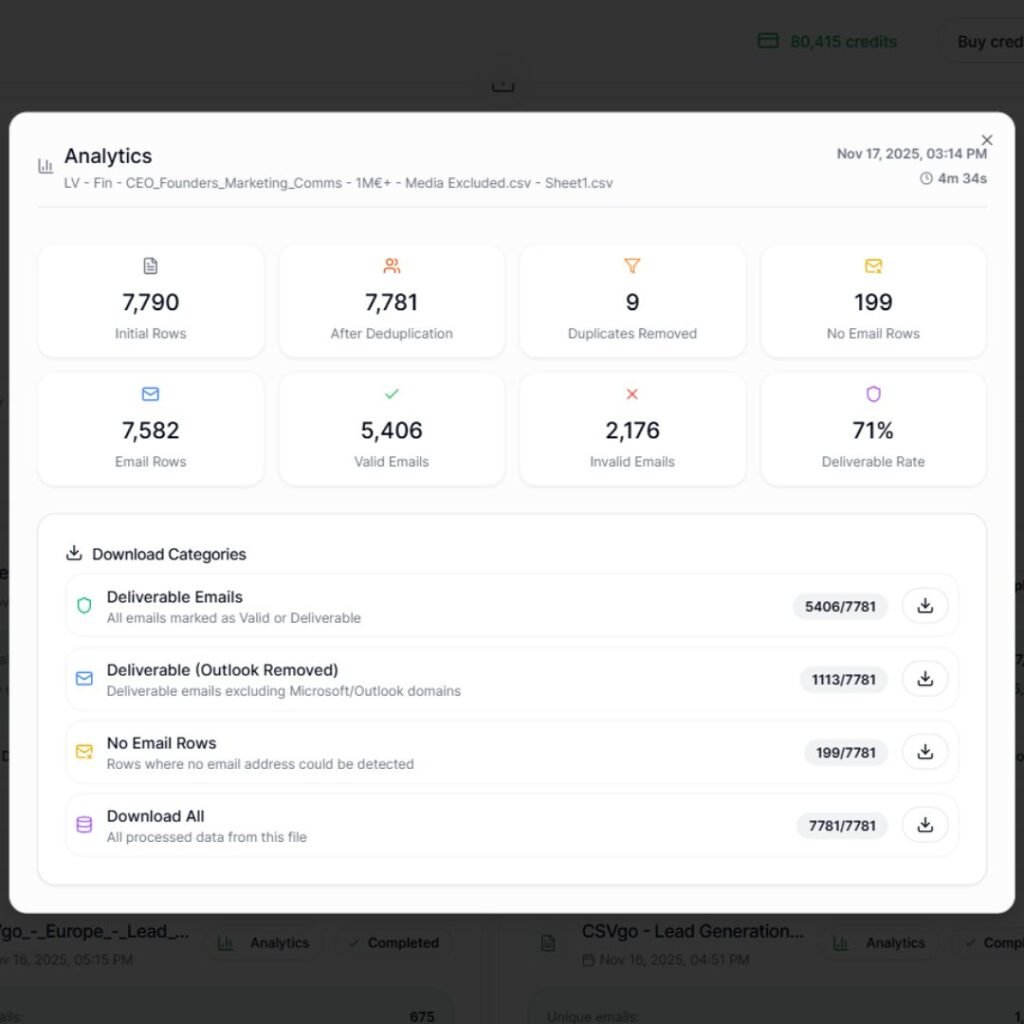
Once the file is clean you can sort by provider and split your sending. Gmail-heavy segments on one schedule, Outlook and gateway segments on a slower one. If you are still putting your outbound stack together, this fits alongside the other sales tools worth using early. Before you send, the rest of the setup matters too, and I covered that in the cold email outreach guide.
How To Read an MX Record: Priority, Host and TTL
An MX record has 3 parts you actually read: priority, host and TTL. Once you know what each one does, a lookup result stops looking like noise.
| Priority | Host | TTL |
|---|---|---|
| 10 | mail1.example.com | 3600 |
| 20 | mail2.example.com | 3600 |
Priority is the number on the left, and lower wins. Mail goes to mail1.example.com first because 10 beats 20. If that server is down or refusing connections, the sending server falls back to mail2.example.com. The numbers themselves mean nothing on their own, only their order matters, which is why you see 1 and 5 on some domains and 10 and 20 on others.
When two records share the same priority number, mail gets spread across them roughly evenly. That is how bigger providers share incoming load across several servers.
Host is the mail server hostname. This is the field you read to identify the provider, and it is the only part of the record that tells you anything about the company you are looking at.
TTL is time to live, in seconds. It says how long other servers are allowed to remember this answer before asking again. A TTL of 3600 means one hour of cache. Drop it to 300 before you plan a migration so changes spread fast, then put it back up once everything is stable.
MX Record Example (Annotated)
Here is what a domain on Google Workspace looks like when you run a lookup on it, with every field labeled.
| Type | Name | Priority | Value | TTL |
|---|---|---|---|---|
| MX | @ | 1 | aspmx.l.google.com | 3600 |
| MX | @ | 5 | alt1.aspmx.l.google.com | 3600 |
| MX | @ | 5 | alt2.aspmx.l.google.com | 3600 |
| MX | @ | 10 | alt3.aspmx.l.google.com | 3600 |
| MX | @ | 10 | alt4.aspmx.l.google.com | 3600 |
Reading it line by line:
- Type is MX on every row, which just confirms these are mail records and not website records
- Name is
@, meaning the record applies to the root domain rather than a subdomain - Priority runs 1, 5, 5, 10, 10, so
aspmx.l.google.comgets the mail first and the rest are backups in order - Value contains
aspmx.l.google.com, which is the fingerprint. This domain runs Google Workspace - TTL is 3600, so other mail servers cache this answer for an hour
Google also supports a newer single-record setup that uses smtp.google.com at priority 1 instead of the 5 records above. Both are Google Workspace, so when you see either one you can log it the same way. The 5-record version is still everywhere because most domains were set up before the change and nobody goes back to tidy working DNS. Google documents the current values on its Workspace MX record page.
Common MX Record Problems
Most MX problems show up as email that quietly stops arriving, and the cause is usually one of 5 things. Here is the short version, symptom first.
| Symptom | Cause | Fix |
|---|---|---|
| Senders get a “no mail server” bounce | The domain has no MX record | Add an MX record pointing to your provider’s hostname |
| Some servers deliver, others reject | The MX points at a CNAME instead of a real hostname | Point the MX at a hostname that has its own A record |
| Mail keeps landing on the backup server | Priority numbers are the wrong way round | Give the main server the lower number |
| Mail still goes to the old provider after a migration | The old MX record was never deleted | Remove the old record so only the new one is left |
| Changes take a day to show up anywhere | TTL is set too high | Lower TTL to 300 before the change, raise it after |
The migration one causes the most damage in real life. Somebody moves a company from one provider to another, adds the new records, forgets to delete the old ones and then spends 2 weeks wondering why half the team’s email disappeared into a mailbox nobody logs into any more.
MX Record FAQ
Almost nothing gets through. Sending servers fall back to the domain’s A record and try to deliver there, but a parked domain or a plain web server is not running a mail service, so the message fails. Treat a domain with no MX record as undeliverable and remove it from your list before you send.
An A record points a domain to an IP address so browsers know where the website lives. An MX record points a domain to a mail server hostname so other mail servers know where to deliver email. One handles web traffic, the other handles mail, and they are set independently of each other.
No. The DNS spec says an MX record must point to a hostname that resolves directly to an address, and pointing it at a CNAME breaks that rule. Some mail servers tolerate it and others reject the message outright, which produces the worst kind of bug where mail works for some senders and vanishes for others.
Google Workspace domains show either aspmx.l.google.com with 4 alt backups on priorities 1, 5, 5, 10 and 10, or a single smtp.google.com record on priority 1. Both mean the same thing. Free personal Gmail addresses do not have their own MX records because they use Google’s own domain.
Run an MX lookup and read the hostname. mail.protection.outlook.com means Microsoft 365, aspmx.l.google.com means Google Workspace, mx.zoho.com means Zoho and anything containing pphosted, barracudanetworks or mimecast means the company put a security gateway in front of its mailboxes.
Yes, quite a lot. Gmail is the most forgiving of the big providers, Microsoft 365 filters harder than most people expect and enterprise gateways like Proofpoint, Barracuda and Mimecast are the toughest of all. Provider is not the only factor, since domain reputation, warmup and content still matter, but it tells you what you are up against before you press send.
Use a list tool rather than a single-domain lookup. csvgo.io checks 50k+ MX records inside a CSV while it verifies emails, verifies catch-all addresses and cleans up company names, so you get a provider column across the entire file instead of one answer at a time.
It depends on the TTL that was set before you made the change. A TTL of 300 seconds means most servers pick up the new record within about 5 minutes, while a TTL of 86400 means some will keep using the old one for a full day. Lower the TTL a day before a planned migration and you avoid the wait.
What To Do With an MX Record Once You Have It
An MX record takes 30 seconds to read and tells you who hosts a company’s email, how hard your cold email is going to have to work and whether the address is even live. Run one domain through the MX lookup tool, or push the whole list through csvgo.io when you need the provider with verified emails for thousands of rows at once. Once those replies start coming back, Fluid CRM gives you a visual pipeline so none of them get buried.