

Most outreach trackers are built to count messages sent. The rows that matter are the few people who wrote back interested, and those are the leads that die in a sheet. This template keeps both, and it shows the point where the replies need to move to a CRM.
An outreach tracker is one row per prospect with the channel, step, last touch, next touch and status, plus one rule that every interested reply gets a next step and a date the same day. Google Sheets handles the touches well. Once replies need reminders, move them to a pipeline like Fluid CRM.
What an Outreach Tracker Should Tell You Each Morning
A tracker is worth keeping if it answers three questions in under a minute: who is due a message today, who wrote back since yesterday and which interested reply has no next step written down yet.
Most templates online answer the first question and stop there. They give you a status column, a reply rate and a list of who to follow up with. The third question gets no column at all, and it is the one that costs money, because an interested person who hears nothing for a week books a call with someone else.
So try this before you build anything. How many people replied interested last week, and could you name the next step for each one without scrolling?
If the answer is no, the template below fixes that. If you already know you want a pipeline instead of a sheet, a simple CRM does the same job with reminders built in.
The Outreach Tracker Template: 13 Columns for Email and LinkedIn
The same layout works as an outreach tracking spreadsheet for email and LinkedIn. One row is one person, never one message, so a person you email and then message on LinkedIn stays on a single row and never gets the same pitch twice.
| Column | What goes in it | Example |
|---|---|---|
| A. Name | First and last name | Dana Price |
| B. Company | Company name | Northline Studio |
| C. Email | Work email, if you have one | dana@northline.co |
| D. LinkedIn URL | Profile link, so one click opens the thread | linkedin.com/in/danaprice |
| E. Channel | Email, LinkedIn or Both | |
| F. List | Where the name came from | Agency owners, Ohio |
| G. Step | Which touch you are on, for outreach you send by hand | 2 |
| H. Last touch | Date of the last message you sent | Nov 12 |
| I. Next touch | Date you will act next, typed by hand | Nov 17 |
| J. Next step | The next action in a few words | Send case study |
| K. Status | One of the nine statuses below | In sequence |
| L. Reply date | Date they wrote back | (blank) |
| M. Notes | Anything worth knowing before the next message | Hiring two designers |
Paste this line into cell A1 of a new Google Sheet, then use Data, Split text to columns, and name the tab Tracker:
Name,Company,Email,LinkedIn URL,Channel,List,Step,Last touch,Next touch,Next step,Status,Reply date,Notes
Make Channel and Status dropdowns with data validation so nobody types “linkedin” one day and “LI” the next. If you also want a sheet for deals after the first call, our sales tracking spreadsheet covers that side.
Outreach Statuses and When to Set Each One
Nine statuses cover every row. Each has a rule for when to set it, so two people reading the sheet mean the same thing by “interested”.
| Status | Set it when | Next touch |
|---|---|---|
| Queued | The person is on the list and nothing has been sent | Blank |
| In sequence | Messages are going out, by your sending tool or by hand | Blank if a tool sends, a date if you do |
| No reply | The last step went out and nobody answered | Blank, or a date three months out |
| Interested | They asked for more, a price or a call | Required, same day |
| Meeting booked | They accepted a call | The meeting date |
| Not now | They said “ask me in spring” or similar | The date they gave you |
| Not interested | They said no or asked you to stop | Blank, never contact again |
| Bounced | The email failed or the profile is gone | Blank |
| Moved to CRM | The reply is now a deal somewhere with reminders | Blank, the reminder is set in the CRM |
The rule that matters most is in the Interested row. A reply marked Interested without a date in Next touch is the row most likely to lose you a deal.
“In sequence” needs one more note. If Smartlead, Instantly or Lemlist sends your email steps, the tool already logs every touch, so leave Step and Next touch blank on those rows. How many steps to send is its own question, covered in our guide to cold email follow-up.
Google Sheets Formulas for an Outreach Tracker
Four formulas do most of the work. Each one goes where you will see it every morning. If your Sheet uses semicolons between formula parts, swap each comma for a semicolon.
1. A Due today tab
Add a second tab called Due today, paste the same header line into A1 and put this in cell A2:
=IFNA(SORT(FILTER(Tracker!A2:M, Tracker!I2:I<>"", Tracker!I2:I<=TODAY()), 9, TRUE), "Nothing due today")
It lists every row whose Next touch is today or earlier, oldest first. That tab is your morning list.
2. Reply rate by channel
This counts any status that means the person answered, divided by everyone you actually contacted:
=IFERROR(COUNTIFS(Tracker!E2:E,"Email",Tracker!K2:K,"<>",Tracker!K2:K,"<>Queued",Tracker!K2:K,"<>In sequence",Tracker!K2:K,"<>No reply",Tracker!K2:K,"<>Bounced")/COUNTIFS(Tracker!E2:E,"Email",Tracker!K2:K,"<>",Tracker!K2:K,"<>Queued",Tracker!K2:K,"<>Bounced"),0)
Copy it twice and swap “Email” for “LinkedIn” and “Both”. Queued and bounced rows are left out, because nobody can reply to a message that never reached them.
A no counts as a reply in that rate, so add a positive reply rate beside it:
=IFERROR((COUNTIFS(Tracker!E2:E,"Email",Tracker!K2:K,"Interested")+COUNTIFS(Tracker!E2:E,"Email",Tracker!K2:K,"Meeting booked")+COUNTIFS(Tracker!E2:E,"Email",Tracker!K2:K,"Moved to CRM"))/COUNTIFS(Tracker!E2:E,"Email",Tracker!K2:K,"<>",Tracker!K2:K,"<>Queued",Tracker!K2:K,"<>Bounced"),0)
For meetings, count Meeting booked rows the same way. Rows marked Moved to CRM had their call booked in the CRM, so count them there.
3. Interested replies with no date
This is the number to check every morning. It should always be zero:
=COUNTIFS(Tracker!K2:K,"Interested",Tracker!I2:I,"")
Anything above zero means someone said yes and nobody decided what happens next. Fix those rows before you send a single new message.
4. A suggested next touch for hand-sent steps
Add a helper column N called Suggested and put this in N2, then fill it down:
=IF(OR(G2="",H2="",G2<1,G2>=3),"",H2+CHOOSE(G2,3,5))
After step 1 it suggests a date three days later, and after step 2 it suggests five days. Copy the date into Next touch when you agree with it, so your typed dates for Interested and Not now rows never get overwritten.
Tracking LinkedIn Outreach in the Same Sheet
A LinkedIn outreach tracker matters more than an email one, because LinkedIn messages are usually sent by hand. Unless you use an automation tool, nothing logs a connection request for you.
Use three steps for a LinkedIn row. Step 1 is the connection request, step 2 is the first message after they accept and step 3 is one follow-up. Paste the profile link in column D, so the row opens the conversation in one click instead of a search.
If the same person is also in an email sequence, set Channel to Both and keep one row. Two rows for one person is how someone gets a connection request the day after they said no by email. If you also pick up the phone, our cold calling script has five examples that end with a date.
For the email side, from domains to copy, see our cold email outreach playbook. Once a LinkedIn conversation turns interested, it stops being outreach, and our LinkedIn CRM routine shows how to log it as a deal.
Where a Google Sheets Outreach Tracker Stops Working
A Google Sheets outreach tracker works for touches, because a missed touch costs little. Miss one and the next step goes out a day later. An interested reply is different, because it is a person waiting on you.
The Due today tab only shows anything on the morning someone opens it. A reply from Friday afternoon has no date until a person types one, and if two people share the sheet, each can assume the other answered. Google Sheets has no built-in reminder that emails you when a date in a row arrives.
At Fenixtal, my outbound agency, we booked 1,250+ sales calls for clients from cold email, and every interested reply needed a date for its next step before it became a call. A spreadsheet row with a name and a status but no date can’t give it one.
Austin Verner, founder of the cold email agency Cold Emailers, was “managing our pipeline in Google Sheets and it was getting cumbersome.” His testimonial on our site sums up what changed after the move.
“We’re capturing 100% of our interested leads.”
That is the split this template is built for, with touches in the sheet and interested leads in a Fluid CRM pipeline that reminds you.
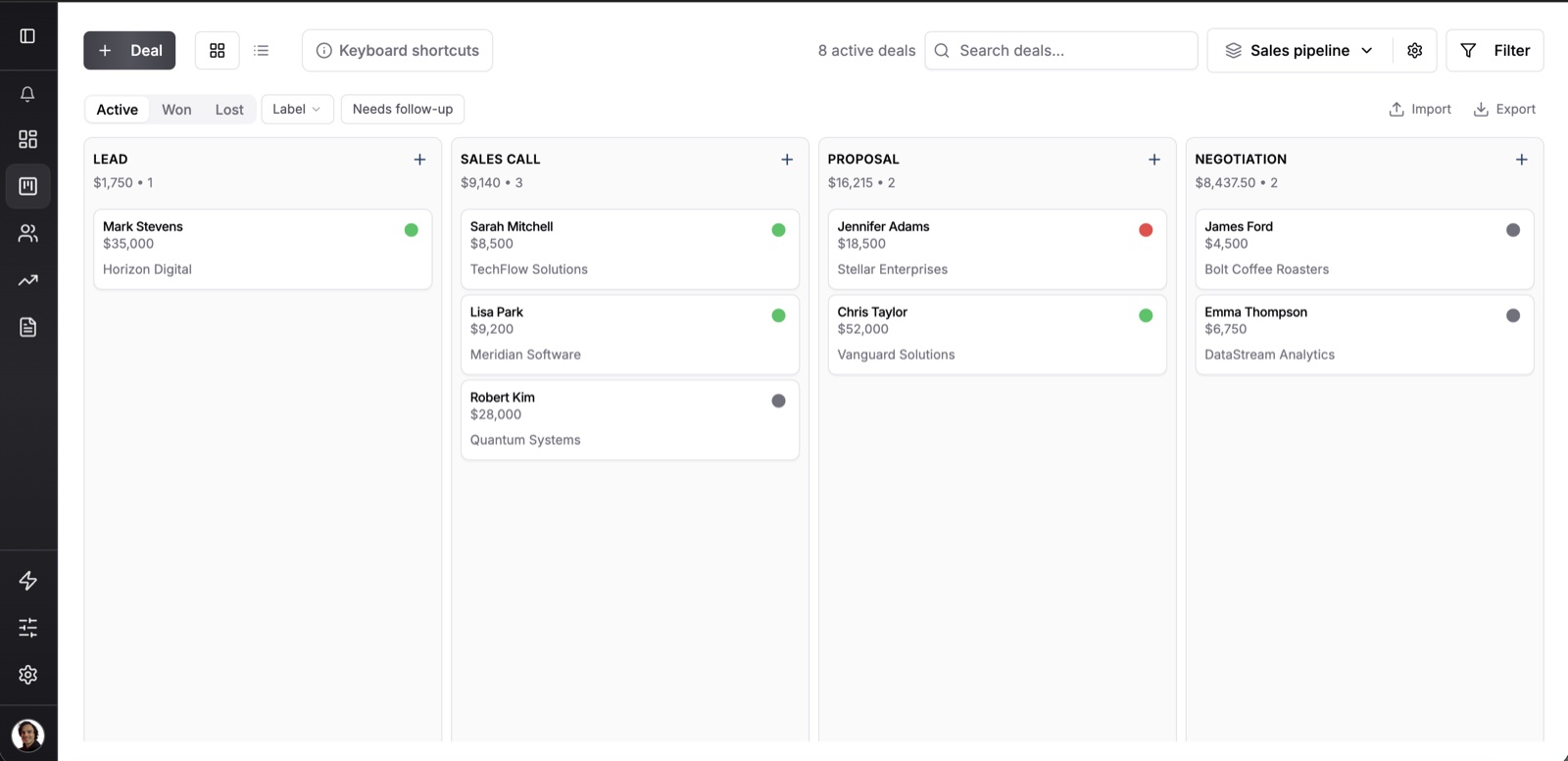
In Fluid CRM, each interested reply becomes a deal on a visual pipeline with a reminder date. Every morning a digest email lists what is due and what is overdue, and it arrives whether or not anyone opened the app the day before. If you send with Smartlead, its webhook and a small automation can create the deal through the Fluid CRM API, so nobody types it in.
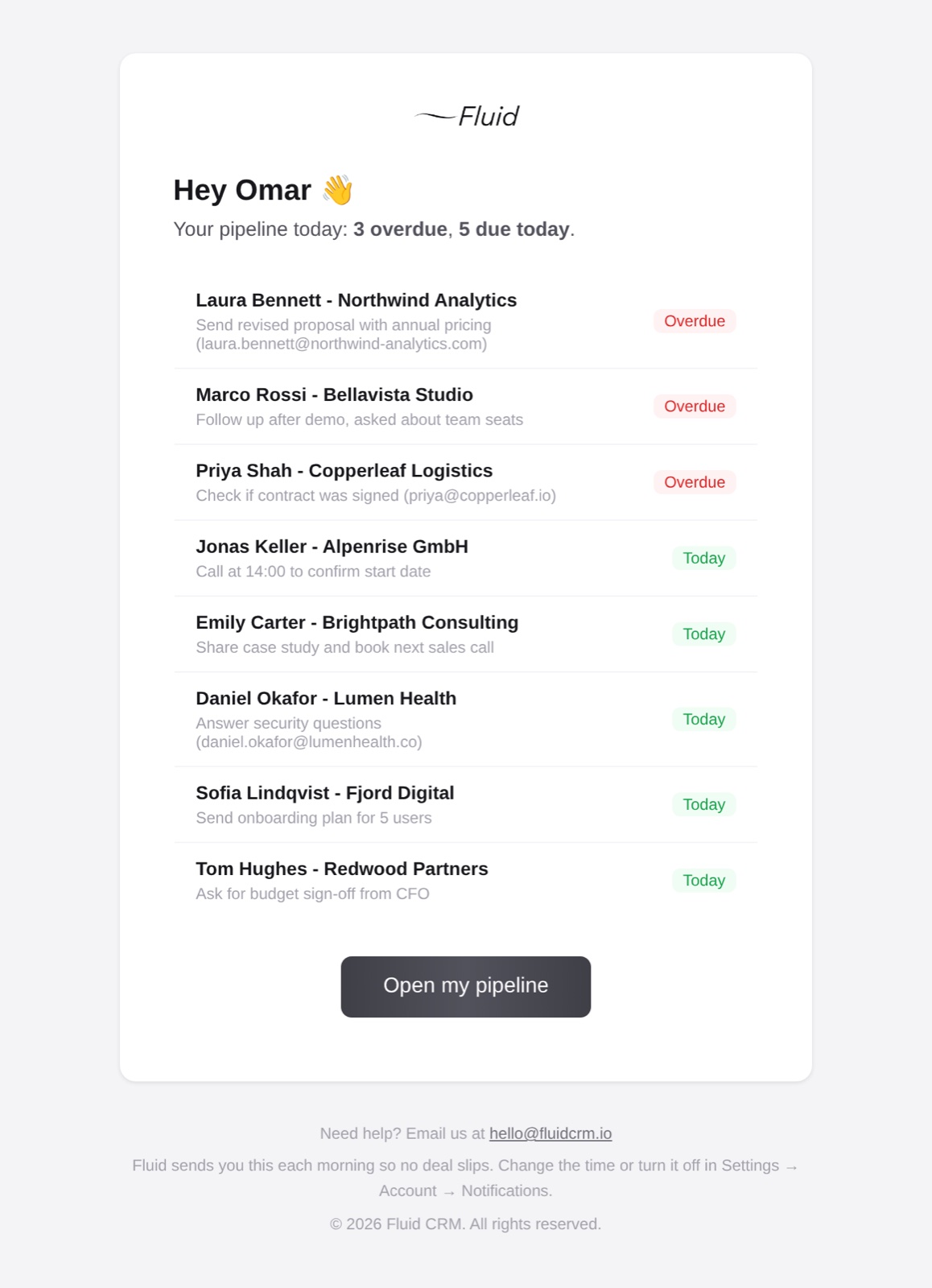
Two limits are worth knowing. Fluid CRM doesn’t send outreach, so keep your sequencer and your sheet for the touches, and each deal has one reminder, a date with no time of day.
It costs $16 per seat per month or $144 per seat per year, with every feature in one plan.
If inbound leads are a bigger problem than outreach replies, our list of lead tracking software compares tools built for that.
Frequently Asked Questions
Name, company, email, LinkedIn URL, channel, list, step, last touch, next touch, next step, status, reply date and notes. The two columns people forget are next touch and next step. Without them the sheet records what happened but never says what to do today.
Yes. Paste the header row from this post into cell A1 of a new Google Sheet and split it into columns. Add the two dropdowns and the four formulas, and the tracker costs nothing and needs no add-on.
Give each person one row with their profile link, set the channel to LinkedIn and use three steps: connection request, first message and one follow-up. Type the date of each next step in the next touch column. Once they reply interested, give the row a next step the same day.
There is no number that fits every list, because reply rates swing with the offer, the list and the channel. Track the rate per list and per channel, then compare each new list against your own earlier ones. A drop against your own history tells you more than any average from someone else’s campaigns.
Move when the first interested reply sits without a date, or when a second person starts editing the sheet. Both mean replies are waiting on someone who may not open the tab today. Keep the sheet for touches and move only the replies.
Keep the Sheet for Touches, Move the Replies to a Pipeline
Build the tracker today and check one number each morning, the count of interested replies with no date. When that number stops being easy to keep at zero, move the replies to a simple CRM like Fluid CRM and keep the sheet for everything before the reply.
Start your 7-day free trial here, no credit card required.