

Your CPA firm already owns software for doing the work. What it usually lacks is a place for the work it hasn’t won yet, and tax season is when those prospects get dropped. Fluid CRM and six other tools below are sorted by the job each one does.
The best CRM for CPA firms is a simple sales pipeline next to your practice management tool. Fluid CRM tracks prospects, unsigned engagement letters and advisory upsells for $16 per seat per month. Karbon, Canopy and TaxDome manage the returns once a client signs. Ignition sends engagement letters for e-signature.
What a CPA Firm Needs From a CRM
A CPA firm sells differently from a marketing agency or a SaaS startup. The calendar decides when prospects show up, partners own the relationships and most new work arrives through someone else’s recommendation. Here are the five needs that decide the pick.
If your firm also sells advisory and planning work, it sells a lot like a consultancy, which is why our consulting CRM page is the closest fit for that side of the practice.
Tax season capacity
Tax season compresses a year of intake into January to April. A prospect who calls in March and says “let’s talk after April 15” is a real lead, but nobody in the firm has time to think about them for six weeks.
Then a second wave arrives. Extended individual returns are due October 15, per the IRS extension rules, so the firm gets squeezed again right when the spring prospects should be getting their follow-up call. A CRM for a CPA firm has to hold a dated reminder for every one of those “later” conversations, or they disappear between the two deadlines.
Engagement letters that stall
A deal isn’t won when the engagement letter goes out. It’s won when the letter comes back signed, and the gap between the two is where a lot of CPA firm revenue dies.
Hanna-Maria Ojala, CEO of the sales coaching firm Menestyvä Myynti, moved to Fluid CRM from Pipedrive and named what changed: “It’s simple to see where each deal stands and what needs to happen next.” In April that is the view a CPA firm is missing, with every unsigned letter in one stage and a reminder on each instead of buried in someone’s sent folder.
Advisory upsell
The cheapest new revenue a CPA firm has is an existing tax client who needs planning, entity advice or outsourced CFO work.
Most firms never track those conversations anywhere. The partner mentions planning during the return review, the client says “good idea” and nobody writes it down. An upsell needs its own pipeline, separate from new prospects, so it gets a stage and a reminder like any other deal.
Partner-owned relationships
In a CPA firm, clients belong to a partner. When that partner is buried in returns, nobody else can see the open proposal or the referral who is waiting on a call back.
A shared board fixes that. Every partner sees every open deal, and each deal carries a label for the partner who brought it in, so a manager can spot a stalled prospect without asking around.
Referral networks
Most CPA firm growth comes from referral partners: estate attorneys, financial advisors, bankers and existing clients. Business brokers can be one too when an owner plans to sell, and our guide to the best CRM for business brokers shows how they track deals. If you don’t record where each deal came from, you can’t tell which referrer sends you work worth thanking.
One field on every deal tells you at year end which relationships to invest in. If you want more of those introductions in the first place, here is how to ask for referrals without making it awkward.
The 7 Best CRMs for CPA Firms
Karbon, Canopy and TaxDome are practice management platforms. They hold documents, portals, e-signatures, workflows and billing for clients who have already signed, and their CRM features are built around those clients rather than prospects.
A CRM for a CPA firm, in the sales sense, is a pipeline for work you haven’t won yet, with a stage and a reminder on every prospect. If you want the wider list that also covers bookkeepers, see our guide to the best CRMs for accountants and bookkeepers. Below, each tool is tagged with the job it does.
| Tool | Job | Best for | Starting price | Free trial |
|---|---|---|---|---|
| Fluid CRM | Sales pipeline | CPA firms of 1 to 15 winning new and advisory work | $16/seat/mo or $144/seat/yr | 7 days, no credit card required |
| Ignition | Proposals and engagement letters | Firms that want letters signed and paid in one step | $39/mo Solo, $99/mo Core (annual) | 14 days |
| HubSpot | Sales pipeline plus marketing | Firms that host webinars and send newsletters | Free for 2 users, Starter $20/seat | Free plan |
| Pipedrive | Sales pipeline | Firms with a dedicated business development person | Lite $14/seat/mo (annual) | 14 days |
| TaxDome | Practice management | Tax-heavy firms that want one platform | $800/seat/yr Essentials (solo only) | Demo |
| Canopy | Practice management | Tax resolution and IRS notice work | $74/user/mo (annual) | Demo, then trial |
| Karbon | Practice management | Firms of 4 or more sharing client work | $59/user/mo Team (annual) | Demo |
1. Fluid CRM
Job: sales pipeline.
Fluid CRM is a visual pipeline for the work your CPA firm hasn’t won yet. Every prospect is a card on a board, each card can have one dated reminder and the board shows the whole firm’s new business on one screen. We built Fluid CRM for small B2B teams that outgrew a spreadsheet and don’t want a heavy suite.
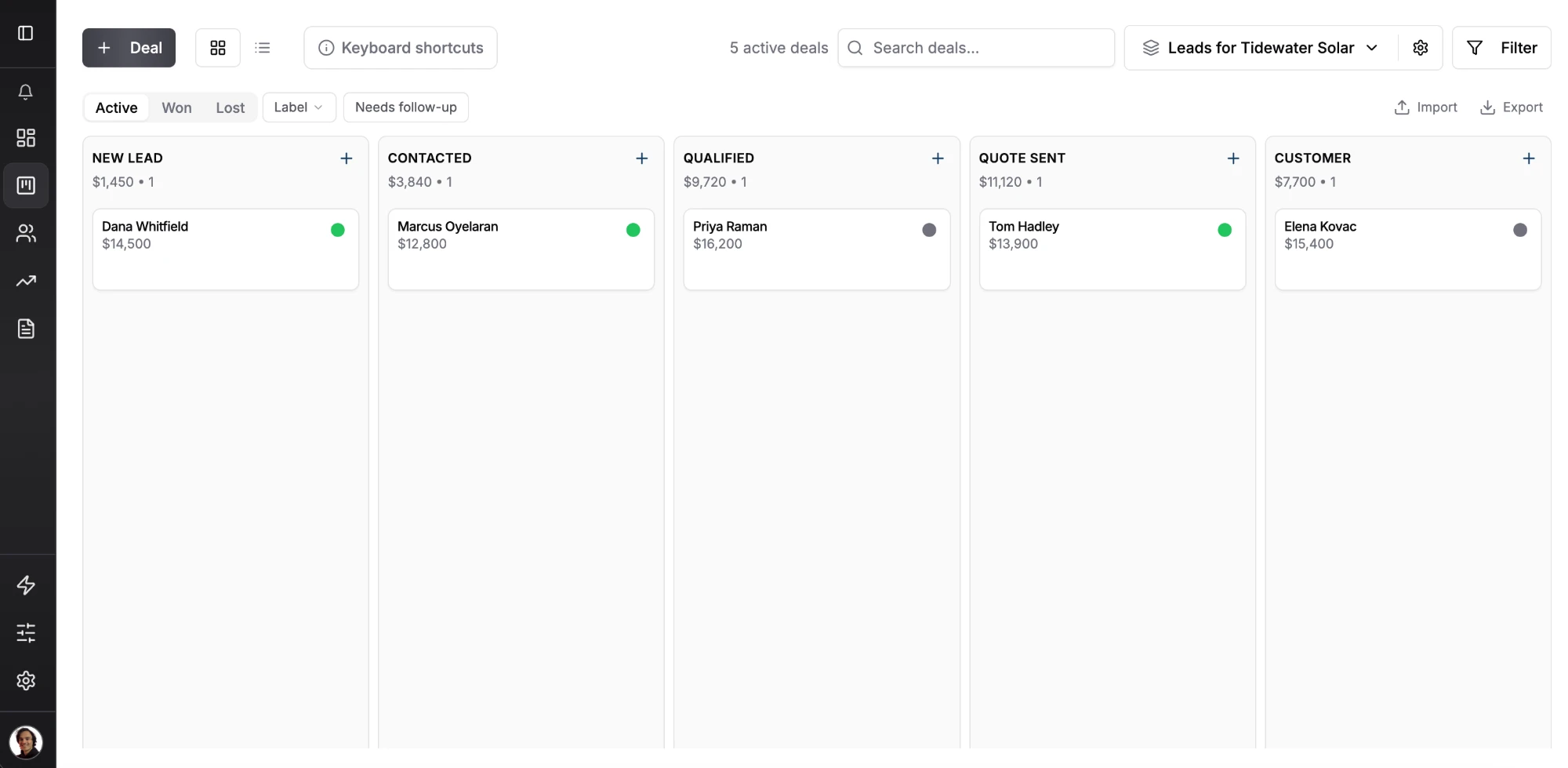
For a CPA firm, the useful parts are the dated reminder on each deal, a daily digest email listing today’s follow-ups, lead capture forms for your website, custom fields, labels and unlimited pipelines.
Jaakko Sahimaa, a business psychologist and founder of a growing business, said the tool “gives me what I need without feeling complicated or overwhelming.” During tax season, that is the difference between a pipeline that gets updated and one that gets abandoned.
Best for: CPA and tax firms of 1 to 15 people that win work through referrals, quotes and engagement letters.
Not for: firms that want client portals, document storage, e-signatures, time tracking or billing in the same tool. Fluid CRM doesn’t sync with QuickBooks or Xero, has no native mobile app (it runs in the phone browser) and logs email by BCC rather than two-way sync.
Cost for 5 seats: $80 a month, or $720 a year on annual billing. Every feature is in the one plan.
2. Ignition
Job: proposals and engagement letters.
Ignition sends proposals and engagement letters for e-signature, then collects payment and sets up billing once the client accepts. For a CPA firm, it shortens the stalled-letter stage more than any CRM can, because the client signs and pays in one step.
Pricing is per firm with user and client limits, not per seat.
Solo is $39 a month on annual billing ($49 monthly) for one user and 20 active clients, for firms under $150k in revenue. Core is $99 a month annual ($149 monthly) for 3 users and 50 active clients. Pro is $229 annual ($279 monthly) for 15 users and 350 clients.
Where it falls short: the deals pipeline is a $49 a month add-on below the $399 Pro+ plan, so most firms are paying extra to track prospects before a proposal exists.
3. HubSpot
Job: sales pipeline plus marketing.
HubSpot makes sense for a CPA firm that markets itself, with a newsletter, tax-update webinars and landing pages. The free plan covers up to 2 users with basic contacts and deals.
Starter lists at $20 per seat. The deeper automation and reporting most growing firms want are on Professional at $90 per seat per month on annual billing or $100 monthly, plus a required one-time onboarding fee of $1,500. Enterprise is $150 per seat with a one-time onboarding fee of $3,500.
Where it falls short: most of what Professional adds is marketing and automation, which a firm whose new business comes from referrals rarely uses, and the $1,500 onboarding fee comes on top.
4. Pipedrive
Job: sales pipeline.
Pipedrive fits a larger CPA firm with a person whose job is business development. Its pipeline is solid and its automation goes deeper than most tools here.
Lite is $14 per seat per month on annual billing or $24 monthly. Email sync and automations start on Growth at $39 annual or $49 monthly, and Premium is $59 annual or $79 monthly.
Where it falls short: the plan most firms need is Growth, so a 5-person firm pays $2,340 a year. For partners who open the CRM twice a week between returns, that is more tool than they will use.
5. TaxDome
Job: practice management.
TaxDome is the all-in-one platform many tax-heavy firms land on, with client portals, document storage, e-signatures, workflows, proposals and payments. Its most CPA-specific feature is seasonal seats for temporary tax-season staff.
Essentials is $800 per seat per year and is for solo users only. Pro is $1,000 and Business is $1,200 per seat per year, all billed upfront. Pro lets you add monthly seats at $100 each, and Business offers 4-month seasonal seats at $500.
Where it falls short: it is built around clients and the work you do for them, not a sales pipeline, so a prospect who said “call me in May” is easier to keep in a tool with a dated reminder on every deal.
6. Canopy
Job: practice management.
Canopy is built around tax work, with a Tax Resolution add-on for IRS notices and transcripts on top of the core practice platform.
Standard is $74 per user per month on annual billing, Plus is $109 and Premium is $149. Tax Resolution adds $50 per user per month.
Where it falls short: the client side is strong, but new business still needs its own pipeline before it becomes a Canopy client.
7. Karbon
Job: practice management.
Karbon is a workflow platform built around a shared team inbox, so client emails, tasks and jobs live in one place. It earns its price once several staff touch the same client.
Team is $59 per user per month annual or $79 monthly, and Business is $89 annual or $99 monthly. Monthly billing needs at least 4 users.
Where it falls short: for a 1 or 2-partner firm, it is a team coordination tool with no team to coordinate. It also tracks client work, not prospects.
How to Set Up a CPA Firm Pipeline in Fluid CRM
Here is the setup we would use for a 2 to 5-partner firm. Across the 1,250+ sales calls booked through Fenixtal, our outbound agency, the firms that lost the most leads tracked new business in a spreadsheet or in a CRM nobody liked opening.
Step 1: build the new client pipeline
Create five stages: Referral in, Discovery call, Scope and fee quoted, Engagement letter sent and Signed. The “Engagement letter sent” stage is the one that matters most, because it holds every deal that looks won but isn’t.
Add one parking stage called “After April 15”. Prospects who want to wait go there with a reminder on the date they named, so they come back on their own instead of relying on someone’s memory.
Step 2: add a required referral source field
Add a text field called “Referral source” to the pipeline and mark it required. Every deal then has to say who sent it, so by December you can export your deals and see which referrers sent the most work.
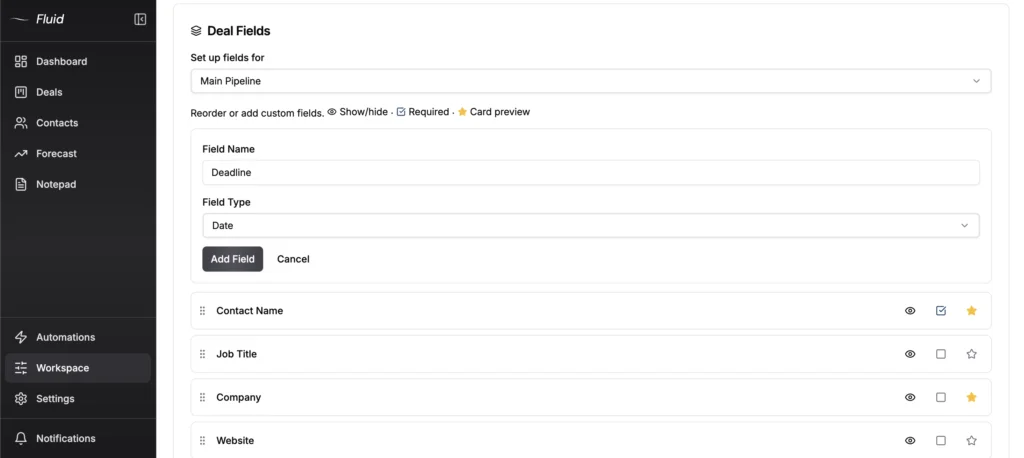
Step 3: label each deal with its partner
Create one label per partner and put it on every deal. Filter the board by a partner’s label during the April crunch and you can see which of their prospects are waiting.
Step 4: add a second pipeline for advisory work
Create a separate pipeline for existing clients: Advisory idea, Review call booked, Proposal sent and Signed. Deal fields in Fluid CRM belong to one pipeline, so add the “Referral source” field here too if you want the same report.
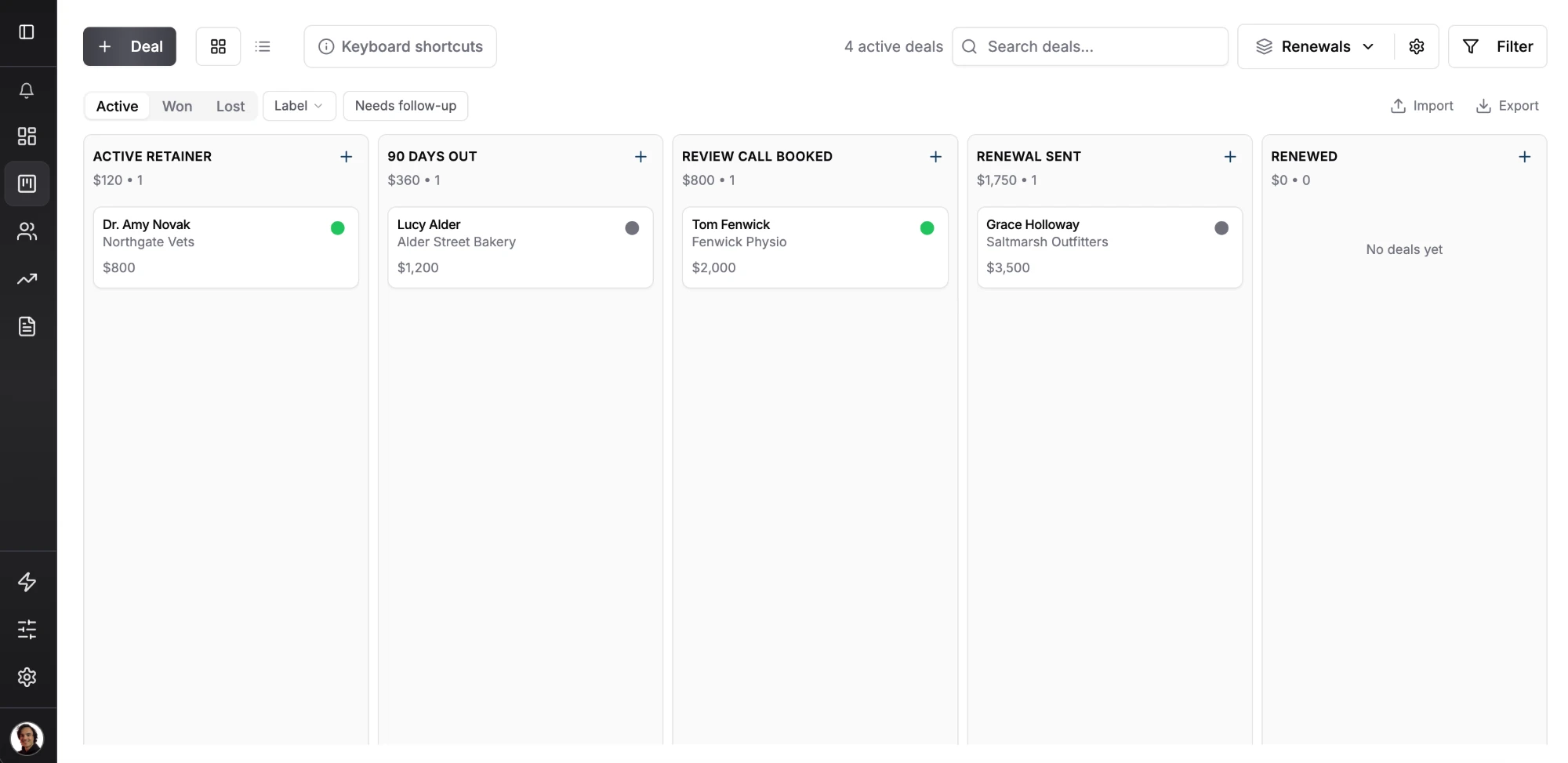
Step 5: check the daily digest and add a lead capture form
The daily digest email is on by default, so every partner starts the day with a list of that day’s reminders. Add a lead capture form on your website’s contact page so every inquiry lands in Referral in as a deal, not as an email someone forgets to copy over.
Which CRM Tax Professionals Should Pick at Each Firm Size
Sales CRMs for CPA firms cost from $14 to $150 per seat per month, and practice management is a separate cost on top. What a firm should buy depends far more on headcount than on features.
Solo tax preparer or enrolled agent
You need a practice management tool and a very simple pipeline. TaxDome Essentials at $800 a year covers the client side for a solo practitioner. Fluid CRM at $144 per seat per year covers new prospects and the “after April 15” list.
If proposals are your bottleneck, Ignition Solo at $39 a month on annual billing handles engagement letters for firms under $150k in revenue.
CPA firm with 2 to 5 partners
This is where pipelines fall apart, because each partner assumes another one followed up. Pick one practice management tool and one shared pipeline. Here is what 5 seats cost per year on annual billing.
| Tool | 5 seats per year | Notes |
|---|---|---|
| Fluid CRM | $720 | Every feature in the one plan |
| HubSpot Starter | $1,200 | At the $20 list price |
| Pipedrive Growth | $2,340 | Growth is where automation starts |
| Ignition Pro | $2,748 | Plus $49 a month for the deals pipeline add-on |
| Karbon Team | $3,540 | Business is $5,340 |
| Canopy Standard | $4,440 | Tax Resolution is extra |
| TaxDome Pro | $5,000 | Essentials is solo only |
| HubSpot Professional | $5,400 | Plus a one-time $1,500 onboarding fee, so $6,900 in year one |
Ignition Core is cheaper but stops at 3 users, which is why Pro is the 5-person number.
Firm with 10 or more staff
At this size, practice management is not optional, and Karbon or Canopy earns its price.
On the sales side, the question is whether you have a dedicated business development person. If you do, Pipedrive or HubSpot will give them deeper tools. If partners still sell between returns, a simple pipeline they open beats a powerful one they don’t.
When a CPA Firm Should Skip a Sales CRM
Not every CPA firm needs a sales CRM, and buying one at the wrong moment just adds a tab nobody opens. Our guide to CRM ROI shows how to check before you buy.
You are at capacity with a waitlist
If you are already turning away work every spring, you don’t have a pipeline problem. You have a pricing or hiring problem, and a CRM won’t fix either one.
Your real need is after the sale
One verified Fluid CRM customer put the limit plainly: “What I was really after was seeing if the tool could handle the full cycle, the ongoing communications and touch points with existing clients after the sale.”
That is practice management’s job, and Fluid CRM is not built for it. If your growth comes from serving current clients better rather than winning new ones, put your money into Karbon, Canopy or TaxDome first.
CPA Firm CRM FAQ
Usually yes, if you are trying to grow. TaxDome and Karbon manage clients who have already signed. A sales CRM tracks the prospects, stalled engagement letters and advisory conversations that come before that point.
For winning new clients, a simple sales pipeline like Fluid CRM at $16 per seat per month fits most solo tax preparers and small firms. For the client work itself, TaxDome and Canopy are built for tax practices. Most tax professionals end up using one of each.
On annual billing, 5 seats cost $720 a year on Fluid CRM, $2,340 on Pipedrive Growth and $5,400 on HubSpot Professional plus a one-time $1,500 onboarding fee. Practice management is a separate cost, from $3,540 a year on Karbon Team to $5,000 on TaxDome Pro.
A CRM can track the deal while the letter is out, with a stage and a reminder until it comes back signed. Sending and signing the letter itself happens in a tool like Ignition or the proposal feature inside TaxDome.
Pick a CPA Firm CRM That Wins the Next Engagement
Your practice management platform keeps signed clients happy, and it was never meant to win the next one. Give the work you haven’t won yet its own pipeline, with a reminder on every prospect and a field for every referral. For more on how advisory-led firms sell, see our consulting CRM page and our guide to CRM for professional services.
Start your 7-day free trial here, no credit card required.