

Pipedrive and Zoho CRM both open at $14 per seat, so the two look level until your team wants its inbox connected. On that day the Pipedrive seat becomes $39 and the Zoho seat stays at $14. Zoho charges for the difference in setup hours, so price those before you pick.
Pipedrive vs Zoho is a choice between a higher price and more setup. Pipedrive charges $39 per seat for email sync and automations and needs little configuring, while Zoho CRM includes both at $14 per user and someone on your team has to build it. Fluid CRM suits teams that only need the pipeline.
Pipedrive vs Zoho: Which One Fits Your Team
Pipedrive suits teams who want to sell on day one, and Zoho CRM suits teams with someone to build it. Find your team in the first column below.
| Your team | Pick | Why |
|---|---|---|
| 1 seller who logs email by BCC | Pipedrive Lite | Unlimited pipelines and 30 custom fields, with no setup project |
| 2 or 3 people with no budget yet | Zoho CRM Free | Up to 3 users at $0, if one pipeline and no connected inbox will do for now |
| 2 to 5 sellers, nobody free to configure a CRM | Pipedrive Growth | Two-way email sync and automations on a board that makes sense on day one |
| 2 to 5 sellers, one person who enjoys building systems | Zoho CRM Standard or Professional | The same jobs for a much lower seat price |
| 6 to 20 sellers with steps every deal must follow | Zoho CRM Professional | Blueprint process rules and 155 custom fields per module |
| 20+ people across several departments | Zoho CRM Enterprise | Territories, approvals and a sandbox, and other Zoho apps to connect |
| Sales, support and marketing wanting one vendor | Zoho CRM | Pipedrive is a sales tool and stays one |
My rule is simple. If someone on the team can give Zoho CRM real hours in the first month and keep looking after it, buy Zoho. If nobody can, the cheaper seat gets you a half-built CRM and Pipedrive is the better deal at the higher price.
Here is how the two compare side by side.
| Pipedrive | Zoho CRM | |
|---|---|---|
| Built around | Deals moving across a board | Records and modules you shape to your business |
| Free plan | None, 14-day free trial | Up to 3 users, 15-day free trial on paid plans |
| Setup help | Pipedrive’s pricing FAQ says implementation is free on plans over $400 a year | Optional Jumpstart service at $200 an hour, 10-hour minimum |
| Built-in AI | Meeting intelligence from Lite | Ask Zia assistant and predictive intelligence from Professional |
| Mobile apps | Yes | Yes |
| Other apps | 500+ integrations | Zoho’s own family of business apps, plus outside integrations |
| Best for | Teams who only sell | Teams who want many jobs in one configurable system |
Both also connect to Claude and ChatGPT, on different terms. Our guides to Pipedrive MCP and Zoho MCP cover what each one meters.
Pipedrive vs Zoho Pricing: Why the $14 Tie Misleads
Pipedrive and Zoho CRM each list a lower rate for paying 12 months up front. Here is every plan on that rate, with the month-to-month price in brackets.
| Level | Pipedrive, per seat a month | Zoho CRM, per user a month |
|---|---|---|
| Free | Not offered | $0 for up to 3 users |
| Entry | Lite $14 ($24) | Standard $14 ($20) |
| Middle | Growth $39 ($49) | Professional $23 ($35) |
| Upper | Premium $59 ($79) | Enterprise $40 ($50) |
| Top | Ultimate $79 ($99) | Ultimate $52 ($65) |
Do not compare the $14 entry prices alone, because the two plans do not include the same features. This table shows the cheapest plan where each job becomes available.
| The job | Cheapest Pipedrive plan | Cheapest Zoho CRM plan |
|---|---|---|
| Inbox connected to the CRM | Growth, $39 | Standard, $14 |
| Automations | Growth, $39 | Free, with 5 active rules |
| Follow-up email sequences | Growth, $39 | Standard, $14 |
| Sales forecast | Growth, $39 | Standard, $14 |
| Web forms that create records | Premium, $59, or LeadBooster from $32.50 a month | Free, one form per module |
| Lead scoring | Premium, $59 | Standard, $14, with one rule |
| Several pipelines | Lite, $14, unlimited | Standard, $14, up to 5 |
| 30 or more custom fields | Lite, $14 | Professional, $23 |
So a team that sells from its inbox is really comparing $39 with $14, and Zoho wins that line easily. Pipedrive Lite is still a fair plan for a seller who is happy to BCC emails into the CRM. Our Pipedrive pricing breakdown covers the add-ons in full.
Plan limits on Pipedrive and Zoho CRM
Zoho’s low price comes with counts on nearly everything, and Pipedrive counts too. The difference is which limit you reach first.
| Limit | Pipedrive Growth, $39 | Zoho Standard, $14 | Zoho Professional, $23 |
|---|---|---|---|
| Custom fields | 100 | 10 per module | 155 per module |
| Automations or workflow rules | 50 for the company | 30 per module, 15 active | 80 per module, 40 active |
| Email sequences or cadences | 5 | 20, 10 active | 40, 20 active |
| Pipelines | Unlimited | 5 | 10 |
Ten custom fields is the line most likely to catch a sales team on Zoho Standard. Open your deal form, count what you already record and add renewal date, contract length and referral partner. If you pass ten, your real Zoho price is $23.
What Zoho CRM’s free edition leaves out
Zoho CRM Free is a real product with no time limit, and it has no match at Pipedrive. It gives 3 users one default pipeline and 5,000 records.
It has no email integration, custom fields, forecasts or cadences. Most sales teams will leave it the day they connect an inbox, and the rest leave when a fourth person joins.
When Paid Setup Makes Zoho Cheaper Than Pipedrive
Pipedrive and Zoho CRM cost this much per year on annual billing, before any help with setup.
| Plan | 3 seats a year | 5 seats a year |
|---|---|---|
| Pipedrive Growth | $1,404 | $2,340 |
| Pipedrive Growth with LeadBooster | $1,794 | $2,730 |
| Pipedrive Premium | $2,124 | $3,540 |
| Zoho CRM Standard | $504 | $840 |
| Zoho CRM Professional | $828 | $1,380 |
Now add the setup bill. Zoho’s Jumpstart is optional, and at $200 an hour with a 10-hour minimum it starts at $2,000. Zoho says the final cost depends on your scope, so treat that as the floor.
Take five seats and compare Professional with plain Growth. Zoho saves $960 a year, which means $2,000 of setup takes just over two years to earn back, and Zoho pulls ahead early in year three.
The answer moves with your team and your plan:
- Three seats, Professional against Growth: the gap is $576 a year, so payback takes about three and a half years.
- Five seats, Professional against Growth with LeadBooster: the gap is $1,350 a year, so payback takes about a year and a half.
- Five seats, you do the setup yourself: Zoho saves $960 from the first year, paid for with your own hours.
If that last line is your plan, price it honestly. At $100 an hour for a founder’s time, $960 buys fewer than ten hours.
Who on your team would you hand this to on Monday, and what would they stop doing? Our guide to CRM implementation shows what the work involves.
Who Keeps Pipedrive or Zoho Up to Date Each Day
Setup happens once and record keeping happens every working day, so daily updating matters more than either vendor’s seat price. Fenixtal, my old outbound agency, put 1,250+ sales calls on other companies’ calendars. What happened after each call depended on whether somebody wrote down the next step, whatever CRM the client paid for.
Pipedrive makes that note easy to reach. The board is the main screen, the deal is the main object and a rep can see what to do next without learning the system first.
Zoho CRM asks more of the person typing. A new enquiry usually starts as a lead record and later converts into a contact, an account and a deal, and the screens show whatever your administrator built. Done well it fits your process closely, and done badly every rep inherits the mess.
Nicolas Virtsonis runs a B2B marketing agency and has worked in Zoho, Pipedrive, Salesforce and others. His view on what matters holds for both tools.
“A clean, updatable database is so much more valuable than all the frills…”
If Zoho’s price appeals and the setup does not, look at Zoho’s smaller CRM in our Bigin vs Zoho CRM comparison. If neither vendor feels right, we keep lists of Pipedrive alternatives and Zoho CRM alternatives.
When a Team Should Skip Both Pipedrive and Zoho
Deals die on the days a record goes out of date, and records go out of date when updating one feels slow. That is why we built Fluid CRM, a sales team CRM for 2 to 10 people with no sales ops person. A deal takes seconds to update, and Claude or ChatGPT can update it from outside the app.
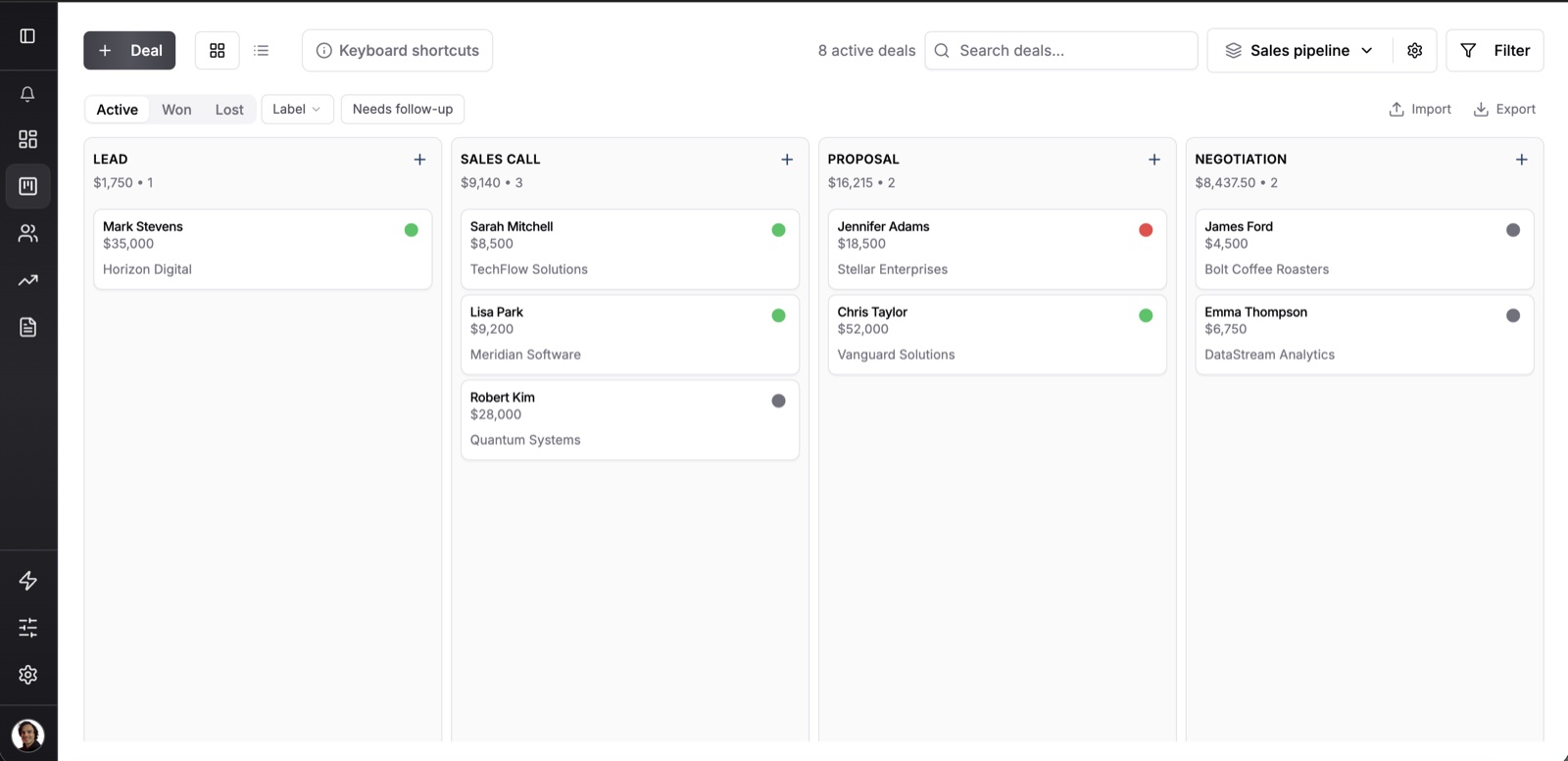
Fluid CRM has one plan at $16 per seat per month or $144 per seat per year. Lead capture forms, 8 in-app automations, a revenue forecast and unlimited pipelines are all in it, so no feature moves to a higher plan when your team grows.
Hanna-Maria Ojala runs a sales coaching business on her own and came across from Pipedrive.
“I’m not guessing what to do next anymore,” she says.
We compare Fluid CRM with each of them in Fluid CRM vs Pipedrive and Fluid CRM vs Zoho CRM.
Two limits matter for this choice. Fluid CRM logs email by BCC with no two-way sync, and it runs in your phone’s browser with no mobile app.
So this is for teams who are happy to BCC, the same way a Pipedrive Lite user works. If your reps need every email synced or a native app in the field, Fluid CRM is not the tool for it.
Pipedrive vs Zoho FAQ
Pipedrive is easier to start with because the deal board is the main screen and there is little to configure. Zoho CRM takes longer to learn and depends on how well it was set up. A well-built Zoho account can feel simple, but somebody has to build it.
Yes, and it stays free for as long as you have 3 users or fewer. The free edition has one pipeline and 5,000 records, with no email integration, custom fields, forecasts or cadences. Most sales teams move to a paid plan once they want their inbox connected.
Yes, on the seat price at every level above entry. For inbox sync and automations you pay $14 per user on Zoho CRM Standard and $39 per seat on Pipedrive Growth. Paid setup at $2,000 or more can cancel that saving for more than a year.
Yes. Pipedrive includes its MCP server on every plan with token limits, and Zoho MCP uses your plan’s API credits. Check what each assistant can change before you connect it to live deals.
Yes. Both offer imports for data coming from a spreadsheet or another CRM, and both have free trials to test with real records. Automations do not carry over and custom fields have to be recreated first, so plan to rebuild both by hand.
A One-Tuesday Test for Pipedrive and Zoho
You do not need a long evaluation to choose between Pipedrive and Zoho CRM. Start both trials, load the same ten live deals and have one seller run a normal Tuesday in each.
- Log a call, send an email from the deal and move it a stage.
- Set the next step and find it again the following morning.
- Add the three fields your team cannot live without.
- Ask who would fix an automation that stopped working.
The tool your seller finishes that list in without help is the one your team will keep updated. If both feel like more than your team needs, Fluid CRM is a sales team CRM you can test the same way on the same ten deals.
Start your 7-day free trial here, no credit card required.