

Your pipeline rarely falls apart in one bad week. A deal misses its follow-up on Tuesday, nobody opens the board on Wednesday and by Friday three buyers have stopped expecting to hear from you. Leads die on the days the CRM stays closed, and that is the problem Fluid CRM and this routine are built around.
Sales pipeline management is the regular work of deciding what happens next with each open deal. Each deal has a next step and a date, stalled deals get one last message and dead ones get closed with a reason. In Fluid CRM that means a morning email, a daily check and a Friday check.
What Is Sales Pipeline Management?
Sales pipeline management is the regular work of deciding what happens next with each open deal, then writing it down where your whole team can see it. Every open deal needs a next step and a date. The work comes down to the routine below, and the times are targets for a board of about 30 open deals. If you don’t have a board yet, start with what a sales pipeline is.
| When | Time | What you do |
|---|---|---|
| Every working day | 5 minutes, plus your calls and emails | Read what is due and overdue, then give each deal a new date |
| Every Friday | 20 minutes | Find deals with no next step, decide what happens to each one and update your sales report template |
| When a deal stalls | A couple of minutes | Send one last message, then close the deal if nothing comes back |
| When a buyer says “not now” | A minute | Keep it open if it can close within your usual sales cycle, otherwise close it with a reminder |
My old agency, Fenixtal, booked 1,250+ sales calls, and I saw where plenty of those leads were kept afterward. It was often a spreadsheet nobody trusted or a CRM nobody wanted to open.
That is why I don’t treat this as a discipline problem. If moving one deal takes six fields and three screens, people skip it on a busy day, and then they stop opening the tool. A sales team CRM has to make an update take seconds, and our guide to CRM data entry covers what to cut if yours doesn’t.
How to Manage Your Sales Pipeline in 5 Minutes a Day
To manage a sales pipeline day to day, read what is due, do the overdue deals first and give every deal you touch a new date. Five minutes covers the reading and the dates, and the calls and emails themselves are your normal selling time.
Step 1: Start with today’s list
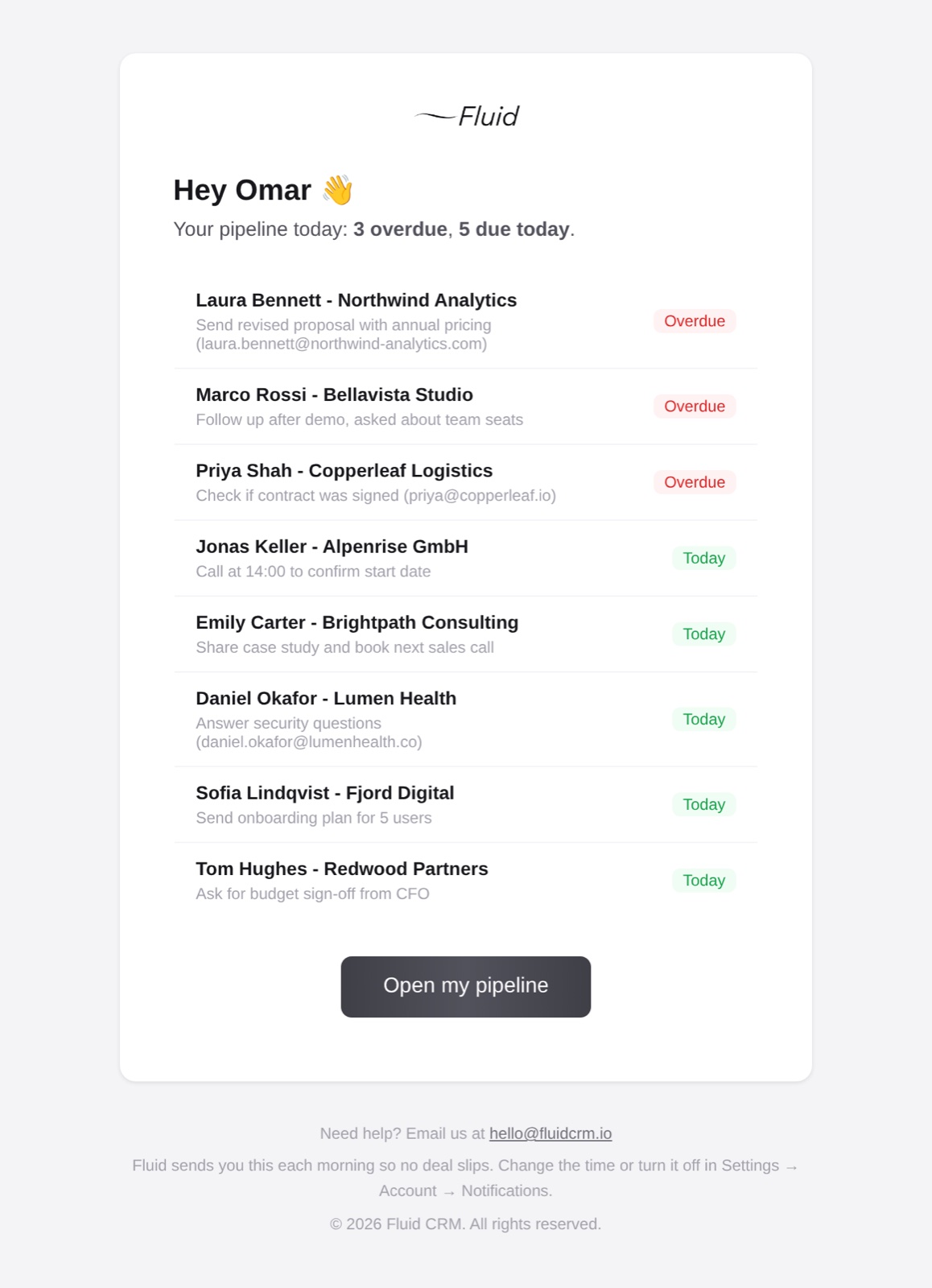
Don’t open the board and look around, because a full board invites you to tidy instead of sell. Start from a list of what is due. Fluid CRM sends each person a morning email with every deal that is overdue or due today, along with the task written on it. If you’re in the app anyway, a CRM dashboard gives you the same counts on one screen.
Step 2: Do the overdue deals first
An overdue deal means someone is waiting on you or has stopped waiting, so clear those before today’s. On the Fluid CRM board, the Needs follow-up filter narrows the view to what needs you, and overdue deals show a red dot.
Step 3: Never leave a deal without its next date
Finish every call or email by setting the next reminder. In Fluid CRM that is one key, R, with your mouse over the deal. Each deal holds one reminder with a date, so the next step is always a single clear thing.
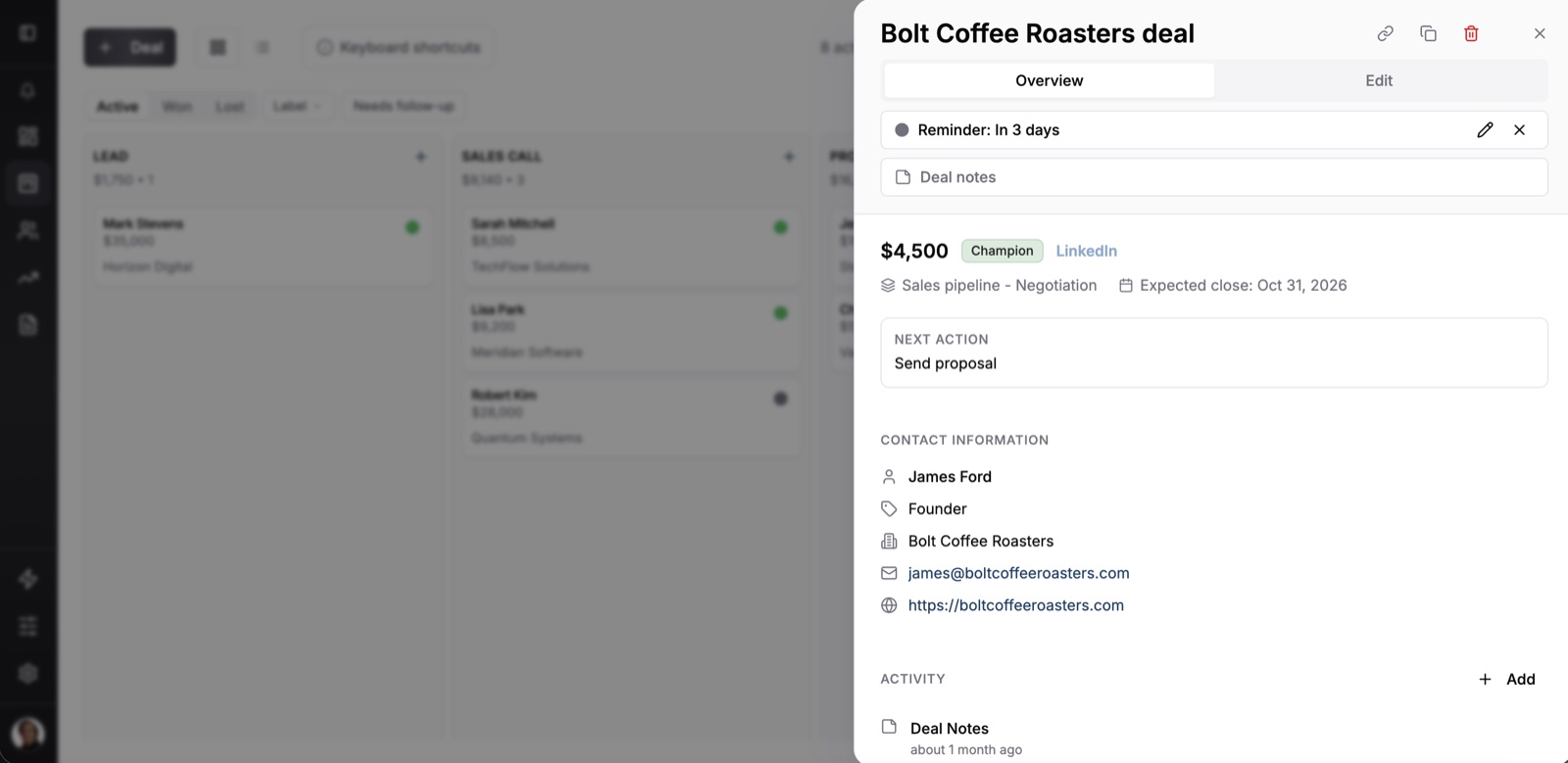
Only move a deal to a new stage when the buyer did something, like agreeing to a call or asking for a price. You sending a proposal nobody has answered is not progress on their side.
A few days into using Fluid CRM for outreach, Viktor Otterskog, an outbound operator, described the idea in three words: “Reminders for action.” That is most of the daily job. Can you name the next step on your three biggest deals right now, without opening a tab?
On days you can’t get to the app, an AI assistant can do the typing. Fluid CRM connects to Claude and ChatGPT through MCP, a standard way for AI tools to work with other software, so you can tell the assistant what happened on a call and tomorrow’s list is already right.
How to Check Your Sales Pipeline Each Friday in 20 Minutes
A weekly pipeline check finds the deals a reminder list can’t show, which are the ones with no date. Each person does this alone for their own deals, before any team meeting. Twenty minutes is a target for about 30 open deals, so a bigger board takes longer.
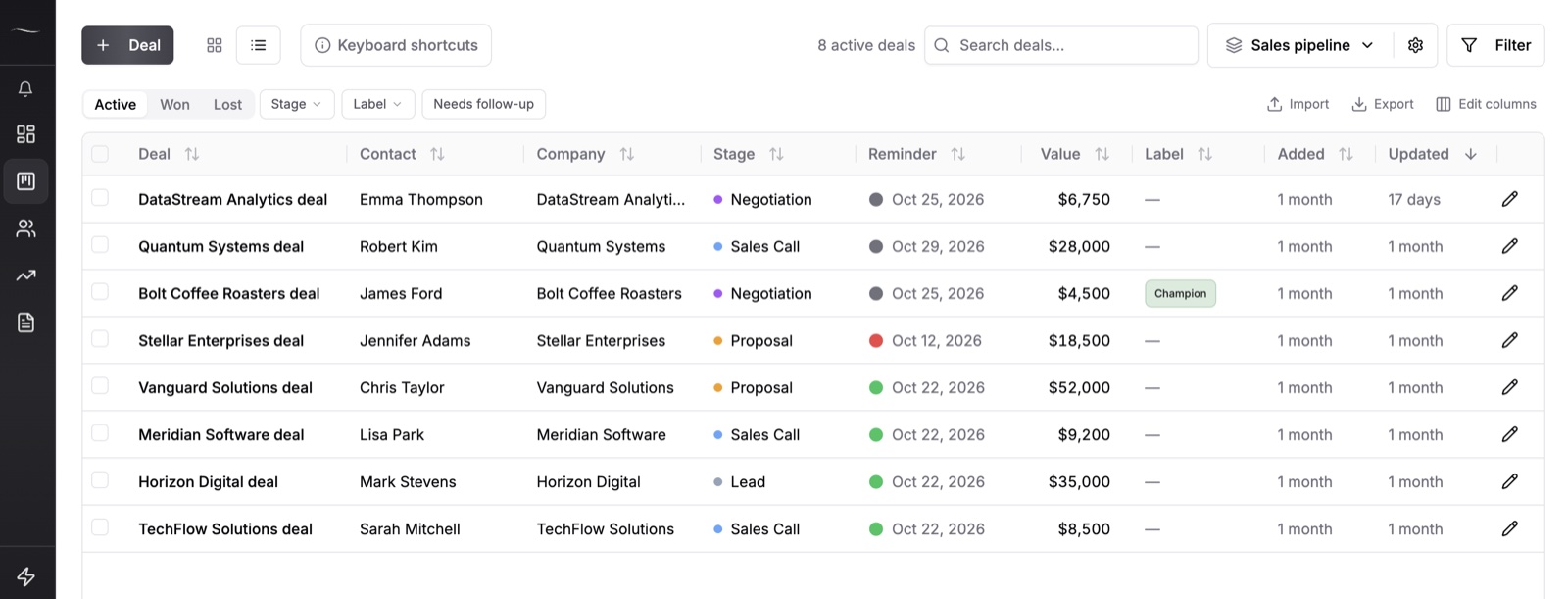
In Fluid CRM, switch to the list view, add the Close date column through Edit columns and sort by the Reminder column. Then look for three things.
- No reminder. Nothing will ever bring this deal back to anyone’s attention, and it won’t show up in the morning email.
- A reminder more than a week late. Someone keeps reading this one and doing nothing, so it needs a decision.
- An expected close date that has passed. The date was a guess that turned out wrong, and it needs a new one from the buyer.
Every deal you touch leaves with one of three outcomes: a next step with a date, one last message or a close with a reason. “Check in next week” with nothing new behind it is not an outcome. It only moves the same deal to next Friday.
Kon T., the CEO of a small business running several small projects, puts the payoff plainly in his review: “The main benefit is speed: I can see what is active, what needs follow-up and where each opportunity stands without digging through emails, notes or spreadsheets.”
The team version of this is a meeting, and our sales pipeline review has the agenda. Doing the Friday check first makes that meeting shorter, and it stops dead deals from inflating your pipeline coverage ratio and your sales forecast.
How to Clean a Sales Pipeline: Stalled Deals and Old Boards
A deal is stalled when the buyer has done nothing since you last spoke and you don’t know why. Being quiet for a week during their budget round doesn’t count, because you know the reason. After your normal follow-ups, three steps settle almost every stalled deal.
Step 1: Ask who the deal is waiting on
If it is waiting on you, you don’t have a stalled deal. You have a task you’ve been avoiding, so do it today. If it is waiting on them, go to step 2.
Step 2: Send one last message
Make it easy to say no, and ask for a month so a soft answer still gives you a date. Our guide to the follow-up email after no response covers the messages before this one. The last one can read like this:
“Hi Sarah, I haven’t heard back since the proposal, so I’m guessing this moved down your list. Should I close it on my side, or is there a better month to pick it up?”
Set a reminder for a few days out. Unlike a fourth “just checking in”, this message gives the buyer something simple to reply to.
Step 3: Close it with a reason
If that reminder date arrives with no answer, close the deal. Don’t drag it back a stage, because a deal in an earlier column looks alive and still isn’t. The one honest reason to move a deal backward is a real change on their side, such as your contact leaving the company.
Cleaning a sales pipeline you haven’t touched in months
If nobody has updated the board in months, do this once and then let the Friday check keep it clean. Sort the list by Updated, start with the oldest and ask whether anyone can say in one sentence why each deal is still open. If nobody can, close it.
On a long board, begin with the biggest deals and close the rest as you get to them. A deal that died in spring and gets closed today will show as lost this month in your results. For the ones that matter in Fluid CRM, open the deal panel and change the close date to when it really ended, because Reports follows that date.
Should a “Not Now” Deal Stay Open in Your Pipeline?
A “not now” deal should stay open only if it can still close within your usual sales cycle. If your deals take 30 days and the buyer says “call me in two weeks”, that is a slow deal, so keep it open. If they say “let’s talk next year”, it can’t close in that time, and leaving it open makes your pipeline total look bigger than it is.
| What the buyer said | What to do | Lost reason | Reminder |
|---|---|---|---|
| “Call me in two weeks, we’re finishing the budget” | Keep it open | None | That date |
| “Let’s talk next year” | Close as lost | Not a priority right now | The month they named |
| “No budget, and I don’t know when” | Close as lost | Price or budget | A date you pick, about three months out |
| “We went with someone else” | Close as lost | Chose a competitor | Only if you know when their contract ends |
| Last message, no answer | Close as lost | Went silent | None |
Closing feels like giving up on someone who never said no, so people avoid it. In Fluid CRM it costs you very little. Marking a deal lost asks for a reason, the deal moves to the Lost tab with its history and its reminder stays on it.

When the date arrives, the deal shows up in your morning email with a small “Lost” tag. If they answer, reopen it and carry on.
This has two costs. The deal counts as lost in your reports until you reopen it, so read “Not a priority right now” as paused when you look at the lost reasons. A reminder on a closed deal also drops out of the morning email once it is more than 30 days late, so a missed one won’t keep coming back.
If you would rather keep your lost counts clean, add a “Paused” stage at the end of the board. The deal then stays in your pipeline total, which is the trade you are making. And if you have more than a handful of these, they deserve their own pipeline, which our post on lead nurturing for small business walks through. Brokers deal with this all the time, since an owner may not be ready until a lease ends, and our list of CRMs for commercial real estate shows how to keep those dates.
Sales Pipeline Management FAQ
Manage your sales pipeline every working day and again once a week, aiming for about 5 minutes and about 20 minutes on a board of around 30 deals. The daily check covers the deals that are due. The weekly part finds the deals with no next step, which a daily list can’t show you.
A stalled deal is one where the buyer has done nothing since your last conversation and you don’t know why. A deal that is quiet for a reason you know, like a budget round ending next week, is slow and not stalled.
Go by attempts instead of days, because a fair number of days depends on your sales cycle. After your normal follow-ups, send one last message and close the deal as lost with a reason if nothing comes back. You can reopen it if the buyer comes back.
With a handful of deals, no. Google Sheets or Excel can hold them, but a spreadsheet never reminds you of anything, so the routine depends on your memory. A CRM with a reminder on each deal and a morning email is worth it once you can’t remember every next step.
Whoever owns the deal updates it, because they are the one who knows what was said. One person, usually the owner of the business, should look at the whole board each week. That person checks that every deal has a next date and leaves the selling to the deal owner.
Your First Friday Pipeline Check
This Friday, open your deals, find every one with no next date and give each one an outcome: a date, one last message or a close with a reason. Aim for 20 minutes. The deals you find are ones nothing was going to bring back.
Fluid CRM is a sales team CRM built around this routine, with a visual pipeline, a reminder on each deal, the morning email and lost reasons. It is one plan at $16 per seat per month or $144 per seat per year, so a team of three pays $48 a month.
Start your 7-day free trial here, no credit card required.